Before you start
Перед началом
GAC is a storefront plus an escrow. Your cars appear in the buyer app and on the public site; the money side runs on a smart contract, so a buyer's payment is locked by the contract and released according to the deal's steps — not held by us in a bank account. Settlement is in USDC or another acceptable stablecoin, and the payout currency is set per listing.
GAC — это витрина плюс эскроу. Ваши машины видны в приложении покупателя и на публичном сайте; деньги идут через смарт-контракт: платёж покупателя блокируется контрактом и раскрывается по шагам сделки, а не лежит у нас на счёте. Расчёт — в USDC или другом приемлемом стейблкоине, валюта выплаты задаётся в каждом объявлении.
What you need
Что понадобится
- The dashboard address your admin gave you, and your work email.
- Адрес кабинета, который выдал администратор, и ваша рабочая почта.
- An active Dealer subscription on the account — without it the system will refuse to publish listings and to issue API keys.
- Активная подписка Dealer на аккаунте — без неё система не даст опубликовать объявление и выпустить API-ключи.
- The dealership wallet — needed for on-chain actions (mainly rental) and to issue an API key. Plain selling works without touching a wallet.
- Кошелёк салона — нужен для действий в блокчейне (в основном в аренде) и для выпуска API-ключа. Обычная продажа проходит без кошелька.
Every screen in this guide was captured on the GAC test stand, so the cars, prices and wallet addresses are test data. Your dashboard looks the same; the numbers are yours.
Все экраны сняты на тестовом стенде GAC, поэтому машины, цены и адреса кошельков — тестовые. Ваш кабинет выглядит так же, цифры будут ваши.
General → API Keys → New key issues a key for the Telegram posting bot or another integration; the cabinet asks the dealership wallet to sign the request (no transaction, nothing to pay). The key appears once, in the window that opens right after you issue it: press Copy key there and keep the key the way you keep a password. From then on the list shows only its last four characters, and nobody — our support included — can show the key again.
General → API Keys → New key выпускает ключ для Telegram-бота публикаций или другой интеграции; кабинет попросит подписать запрос кошельком салона (без транзакции и без оплаты). Ключ появляется один раз — в окне, которое открывается сразу после выпуска: нажмите там Copy key и храните ключ так же, как пароль. Дальше в списке видны только его последние четыре символа, и показать ключ снова не может никто, включая нашу поддержку.
Lost a key? Issue a new one, put it where the old one was used — for the bot, send it /setkey and the new key from the same Telegram account — and then delete the old key in the list.
Потеряли ключ? Выпустите новый, поставьте его туда, где стоял старый, — боту отправьте /setkey и новый ключ из того же аккаунта Telegram, — и после этого удалите старый ключ в списке.
Getting started, and what it costs
Как начать и сколько это стоит
There are two account types, and the difference is simple: a personal account buys and rents, a Dealer account sells and lists. Publishing a car — for sale or for rent — is what needs the Dealer plan.
Аккаунта два, и разница простая: личный аккаунт покупает и арендует, аккаунт Dealer продаёт и публикует. Именно публикация машины — на продажу или в аренду — требует плана Dealer.
| Plan | План | Price | Цена | What you get | Что входит |
|---|---|---|---|---|---|
| Personal | Personal | Free | Бесплатно | Buying and renting, unlimited. Smart-contract protection on every deal, the deals CRM, notifications at every step. | Покупка и аренда без ограничений. Защита смарт-контрактом на каждой сделке, CRM сделок, уведомления на каждом шаге. |
| Dealer | Dealer | €89 / month Early access — free until billing launch |
€89 / месяц Ранний доступ — бесплатно до запуска биллинга |
Up to 80 cars in My Garage. Publishing listings, full fleet management, pause and resume, disputes, estimates, switching a car between rent and sale, request and overdue notifications, the extended contract with logistics and insurance partners. | До 80 машин в My Garage. Публикация объявлений, управление парком, пауза и возобновление, споры, оценки, перевод машины между арендой и продажей, уведомления о запросах и просрочках, расширенный контракт с партнёрами по логистике и страхованию. |
Two payments that never mix
Два платежа, которые нельзя путать
- The subscription is billed in euro, by card, through Stripe. It pays for the dashboard, not for a deal.
- Подписка списывается в евро, картой, через Stripe. Это плата за кабинет, а не за сделку.
- Deals are settled in USDC or another acceptable stablecoin and the money sits in the smart contract — not in a GAC wallet. The contract releases it when the agreed steps are confirmed.
- Сделки рассчитываются в USDC или другом приемлемом стейблкоине, и деньги лежат в смарт-контракте, а не в кошельке GAC. Контракт отдаёт их, когда подтверждены согласованные шаги.
- Rentals additionally carry the 9% platform fee, which is part of the rental price and is non-refundable.
- В аренде дополнительно есть комиссия платформы 9% — она входит в стоимость аренды и не возвращается.
Starting, pausing, stopping
Начать, приостановить, прекратить
- Register with your work email and choose the Dealer plan.
- Зарегистрируйтесь на рабочую почту и выберите план Dealer.
- Where a free trial is offered you enter the card at sign-up but nothing is charged during the trial; Stripe warns you before it ends. One trial per account.
- Если доступен пробный период, карту вводят при регистрации, но во время пробного периода списаний нет; Stripe предупредит до его окончания. Один пробный период на аккаунт.
- Link the dealership wallet afterwards — that is where deal money arrives.
- После этого привяжите кошелёк салона — именно туда приходят деньги по сделкам.
- Cancel any time: General → Billing → Manage subscription opens the Stripe portal, one click. No minimum term, no cancellation fee.
- Отменить можно в любой момент: General → Billing → Manage subscription открывает портал Stripe, один клик. Без минимального срока и без штрафа за отмену.
Access runs to the end of the period you already paid for; periods already charged are not refunded. After that you cannot publish new listings and your listings leave the public catalogue — but deals and rentals already in progress run to completion, with their locked funds, deposits and payouts, and your account, data and vehicles stay in place. Subscribing again restores publishing.
Доступ действует до конца уже оплаченного периода; за оплаченные периоды возврата нет. После этого публиковать новые объявления нельзя, а текущие уходят из публичного каталога — но уже идущие сделки и аренды доводятся до конца вместе с заблокированными средствами, депозитами и выплатами, а аккаунт, данные и машины остаются на месте. Новая подписка возвращает публикацию.
Signing in
Вход в кабинет
The login screen offers two doors. Managers use Email; Wallet is for signing in with the dealership's crypto wallet.
На экране входа два способа. Менеджеры пользуются вкладкой Email; Wallet — вход кошельком салона.
- Open the Email tab, type your work address, press Send code.
- Откройте вкладку Email, введите рабочий адрес, нажмите Send code.
- Take the four-character code from the letter and enter it under Verification code, then Sign in.
- Возьмите четырёхсимвольный код из письма, введите его в Verification code и нажмите Sign in.
- No letter? Resend code sends a new one; Change email lets you fix a typo.
- Письма нет? Resend code пришлёт новый код, Change email — исправить опечатку в адресе.
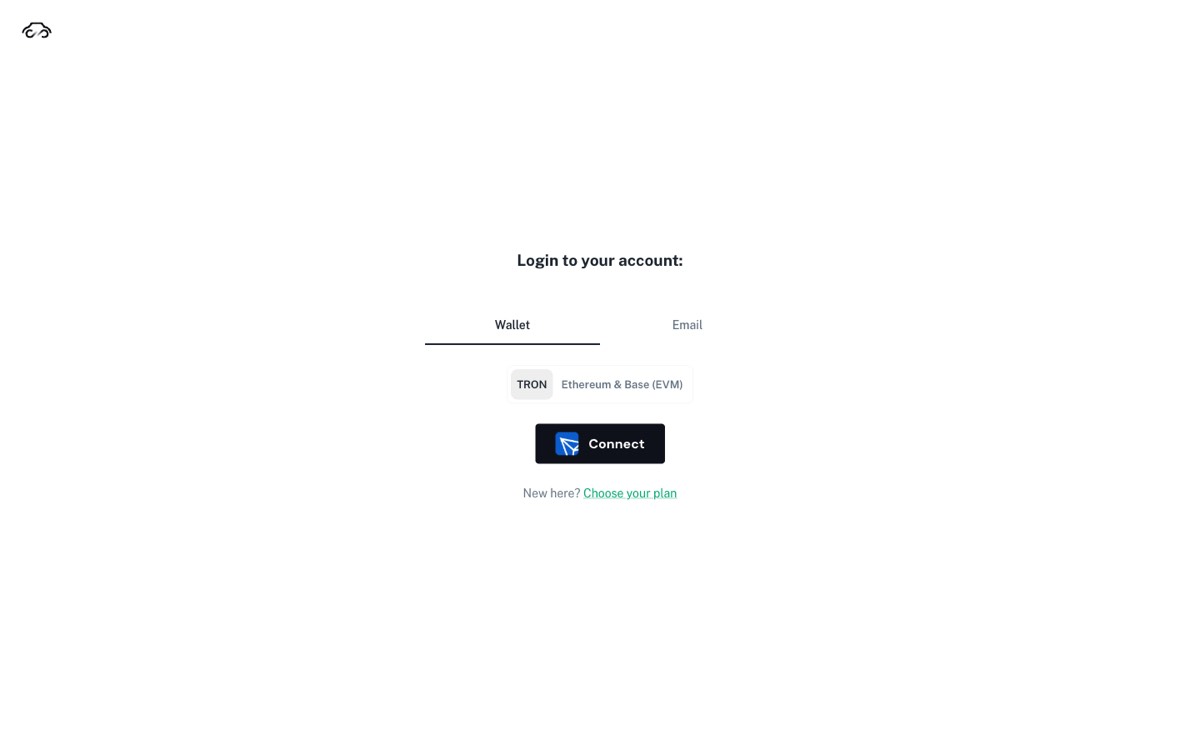
The session lives in the browser tab. Close the tab — or leave the dashboard open for a long while without acting — and you sign in again. If a button seems to do nothing, reload the page and sign in before you decide something is broken.
Сессия живёт во вкладке браузера. Закрыли вкладку — или долго держали кабинет открытым без действий — входите заново. Если кнопка «не работает», сначала обновите страницу и войдите снова, и только потом считайте это поломкой.
Your garage at a glance
Гараж одним взглядом
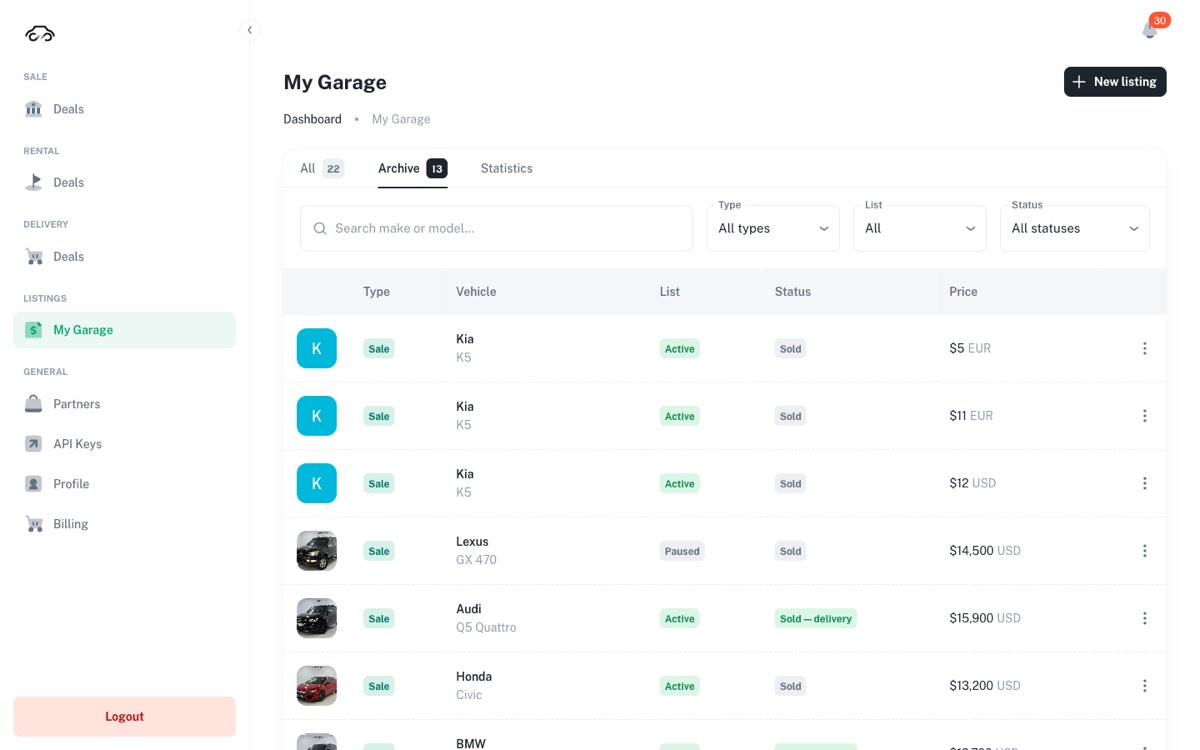
Listings → My Garage is the one list that holds every car you have on GAC — both the ones for sale and the ones for rent. Two columns carry the state, and people mix them up constantly, so learn them first.
Listings → My Garage — единый список всех ваших машин на GAC: и продажных, и арендных. Состояние несут две колонки, их постоянно путают — разберитесь с ними в первую очередь.
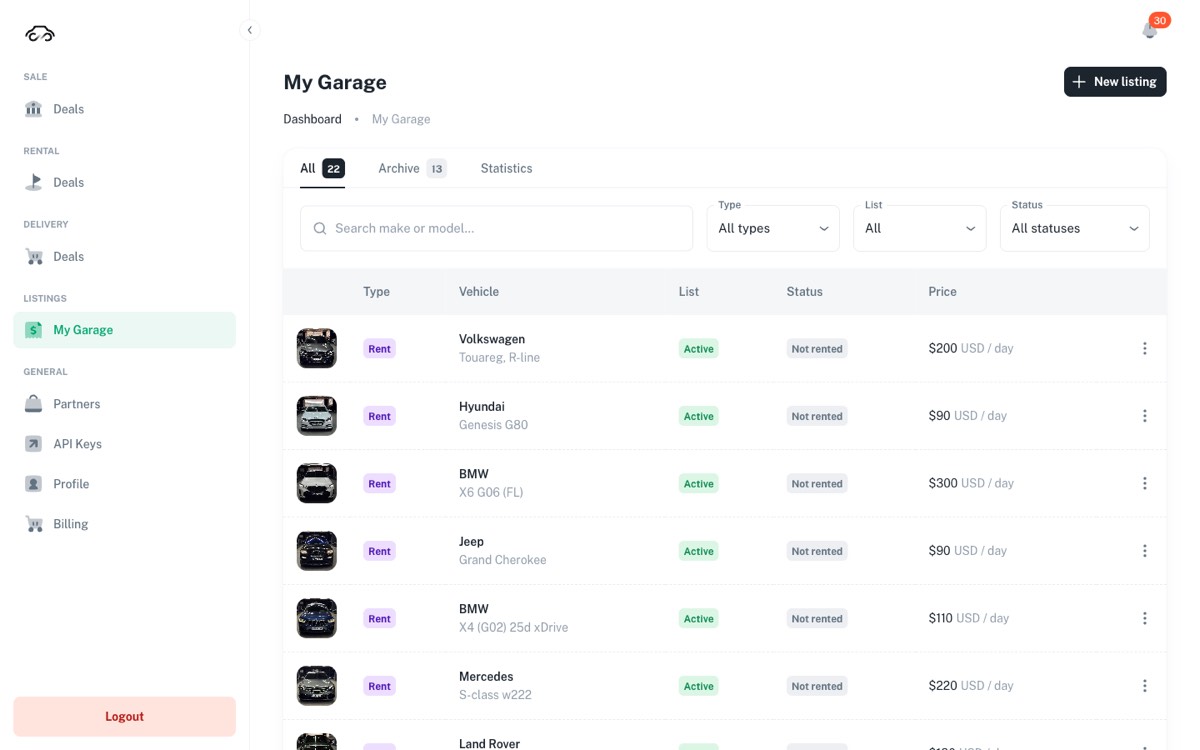
| Column | Колонка | What it means | Что означает |
|---|---|---|---|
| Type | Sale or Rent — which list the card belongs to. One physical car can have both cards. | Sale или Rent — в каком списке карточка. У одной машины может быть обе. | |
| List | Active is visible to buyers. Paused is hidden — you switched it off. Draft · needs info means the card was created automatically and still has no terms filled in. | Active — видна покупателям. Paused — скрыта, вы её выключили. Draft · needs info — карточка создана автоматически, условия ещё не заполнены. | |
| Status | What is happening with the car itself: Not sold, Sale in progress (a buyer is in a deal), Sold, Reserved — delivery (held by a delivery order, still reversible), Sold — delivery. | Что происходит с самой машиной: Not sold, Sale in progress (по машине идёт сделка), Sold, Reserved — delivery (держит заказ на доставку, ещё обратимо), Sold — delivery. |
Active and Sold can appear on the same row: the card is still switched on, but the car is gone. That combination is normal in the Archive tab.
Active и Sold могут стоять в одной строке: карточка включена, а машины уже нет. В Archive это нормальное сочетание.
The row menu
Меню строки
The three dots at the end of a row hold every action for that car: View, Edit, Disable / Enable, Convert to rent (or Convert to sale), Sold offline and Delete.
Три точки в конце строки — все действия по этой машине: View, Edit, Disable / Enable, Convert to rent (или Convert to sale), Sold offline и Delete.
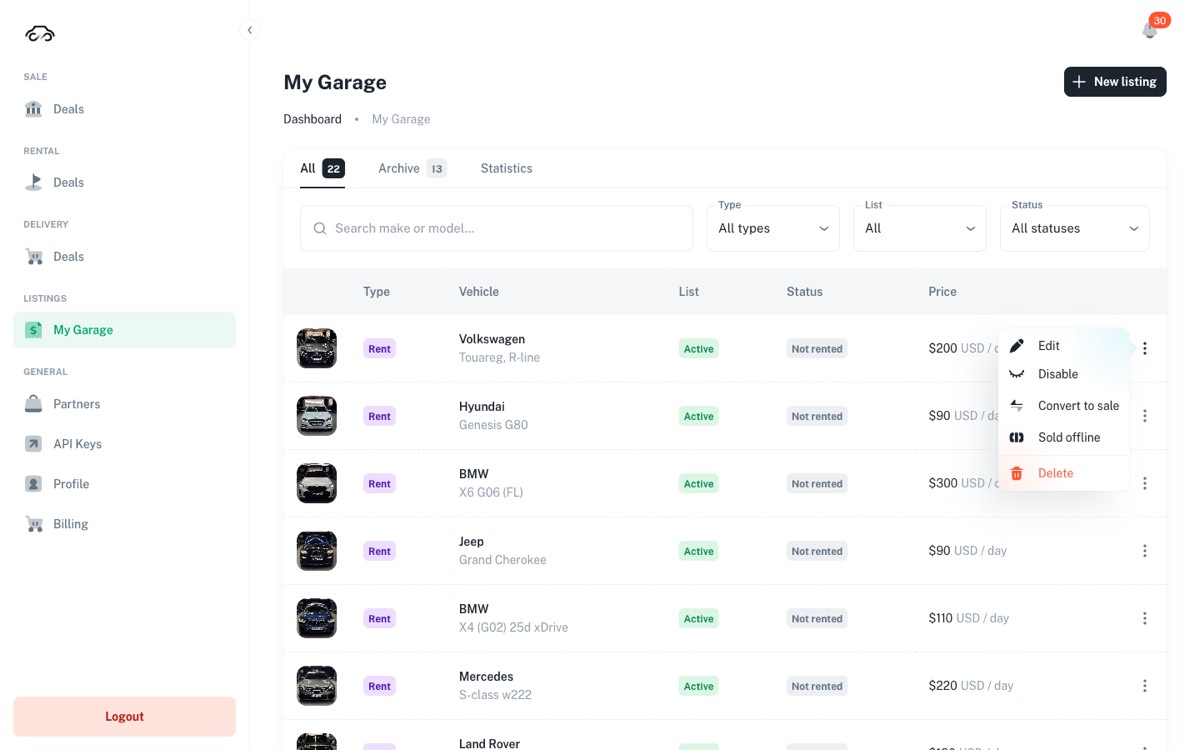
Delete erases the card and its history from your list. When a car leaves the lot, use Sold offline instead — it keeps the record and moves the car to the Archive.
Delete стирает карточку вместе с историей. Когда машина уехала с площадки, используйте Sold offline — запись сохранится, а машина уйдёт в архив.
Listing a car for sale
Ставим машину на продажу
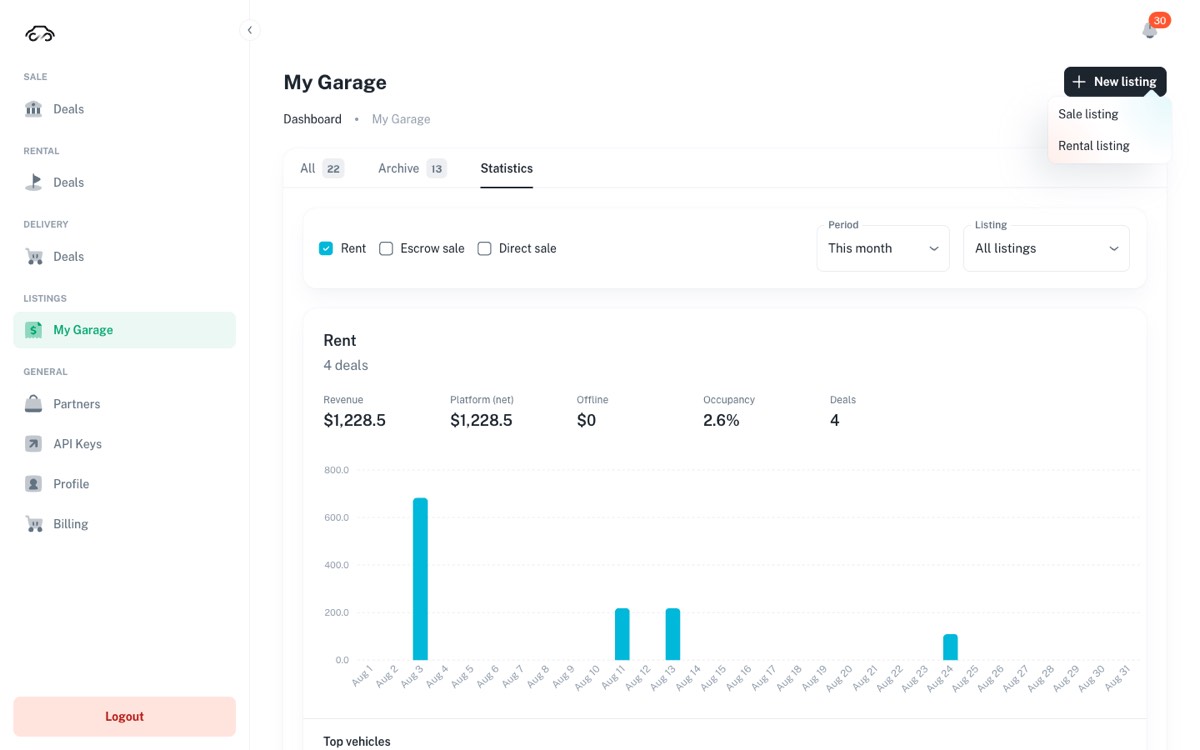
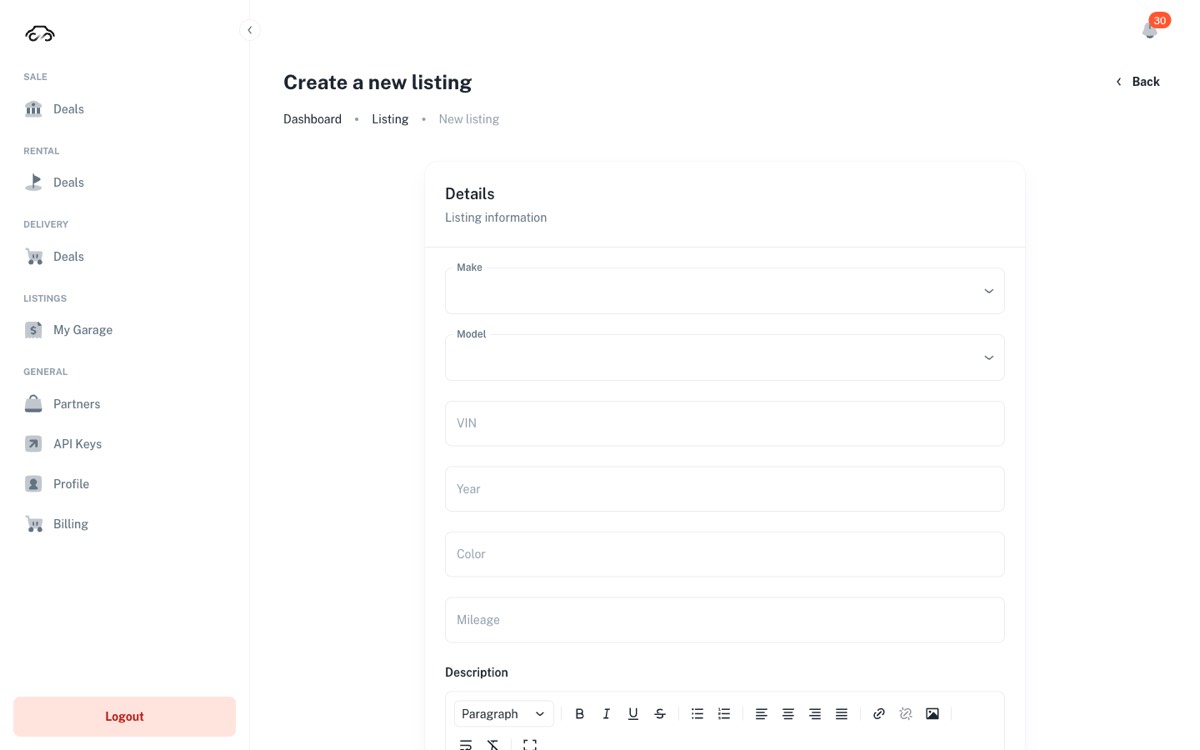
Press New listing in the top right of My Garage and pick Sale listing.
Нажмите New listing справа сверху в My Garage и выберите Sale listing.
- Details. Make and Model come from a list — pick, don't type freely. Then VIN, Year, Color, Mileage and a description.
- Details. Make и Model выбираются из списка — не вписывайте вручную. Дальше VIN, Year, Color, Mileage и описание.
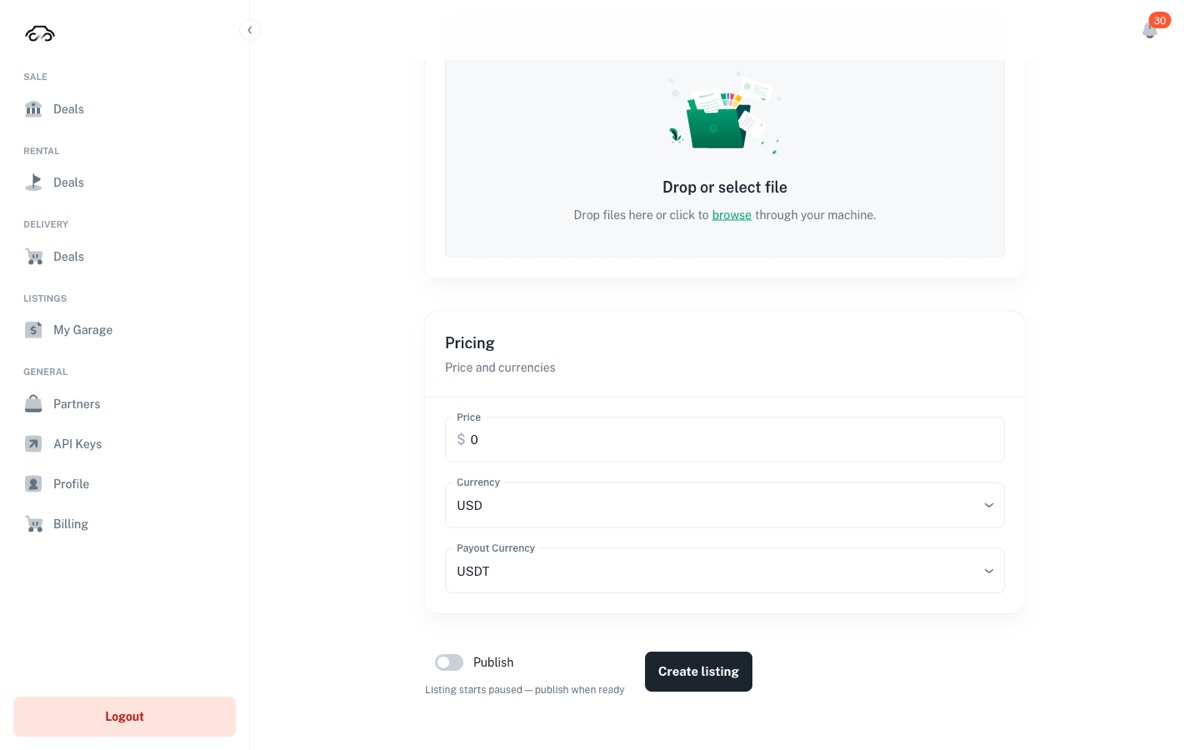
- Photos. Drag them onto the upload area or press browse. The first photo is the one buyers see in the list.
- Фото. Перетащите на область загрузки или нажмите browse. Первое фото — то, что покупатель увидит в списке.
- Pricing. Price plus Currency is what the buyer sees; Payout Currency is the stablecoin you get paid in.
- Цена. Price и Currency видит покупатель; Payout Currency — стейблкоин, в котором вы получаете деньги.
- Publish. The toggle at the bottom decides whether the car goes live. Leave it off to finish the card later, then press Create listing.
- Публикация. Тумблер внизу решает, попадёт ли машина в витрину. Оставьте выключенным, если хотите дозаполнить карточку позже, и нажмите Create listing.
If Enable or the publish toggle returns a subscription error, the account's Dealer plan is not active. Open General → Billing and fix it there; the listing itself is fine and stays saved.
Если Enable или тумблер публикации отвечает ошибкой о подписке — план Dealer на аккаунте неактивен. Откройте General → Billing и продлите; само объявление при этом сохранено и не потеряно.
Three ways a buyer can pay you
Три способа, которыми покупатель платит
The same published car can be bought in three different ways. They land in three different places in the sidebar, and what you have to do differs — this is the single most useful thing to keep straight.
Одну и ту же опубликованную машину можно купить тремя способами. Они приходят в три разных раздела меню, и участие менеджера в них разное — это самое полезное, что стоит держать в голове.
| Path | Путь | Where it appears | Где появляется | Your part | Что делаете вы |
|---|---|---|---|---|---|
| Escrow | Эскроу | Sale → Deals → Escrow | Watch the steps, hand the car over as agreed. The confirmations come from the buyer and the partners, not from this dashboard. | Следите за шагами и передаёте машину по договорённости. Подтверждения приходят от покупателя и партнёров, а не из этого кабинета. | |
| Buy Now | Buy Now | Sale → Deals → Direct (Buy Now) | Nothing to approve. Check that the row says Verified, then release the car. | Согласовывать нечего. Убедитесь, что в строке Verified, и отдавайте машину. | |
| Delivery | Доставка | Delivery → Deals | You act: quote the delivery price and approve — or decline. | Здесь действуете вы: называете цену доставки и подтверждаете — или отклоняете. |
Escrow deals
Эскроу-сделки
An escrow deal is the long form: the buyer's money sits on a contract and is released as the car moves through handover, transport and acceptance. Open Sale → Deals and stay on the Escrow tab.
Эскроу — «длинная» сделка: деньги покупателя лежат на контракте и раскрываются по мере передачи, перевозки и приёмки машины. Откройте Sale → Deals и оставайтесь на вкладке Escrow.
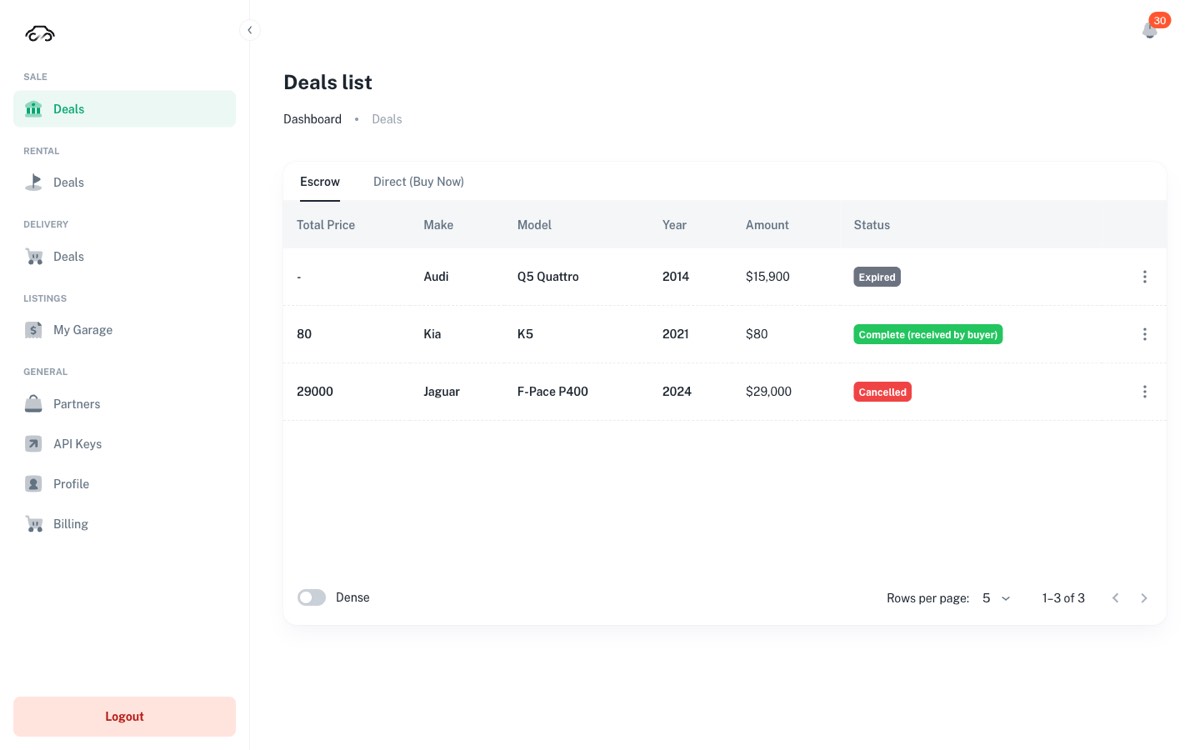
Click a row to open the deal. Deal Info gives the status and the deal's NFT id, Deal Billing Info splits the car price from the service fee, and Deal Contract State is the honest one: a green tick means that step already happened on the contract, a red cross means it has not.
Кликните по строке, чтобы открыть сделку. Deal Info — статус и NFT-идентификатор сделки, Deal Billing Info разделяет цену машины и комиссию, а Deal Contract State — самое честное место: зелёная галочка значит, что шаг уже произошёл на контракте, красный крест — что нет.
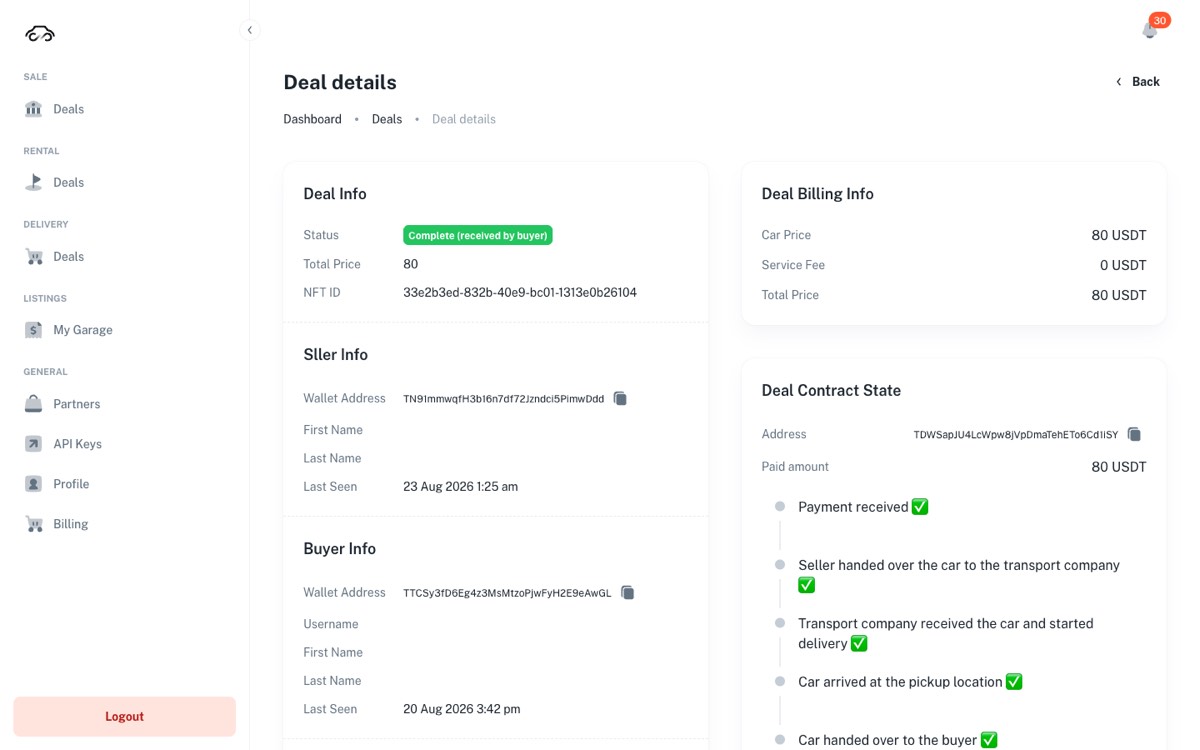
The dashboard shows an escrow deal, it does not drive it. Each step is confirmed by whoever actually did it — the buyer accepts the car in their app, the transport partner confirms pickup and delivery. Your job is to make the physical step happen and watch the tick turn green.
Кабинет показывает эскроу-сделку, но не управляет ею. Каждый шаг подтверждает тот, кто его выполнил: покупатель принимает машину в своём приложении, перевозчик подтверждает забор и доставку. Ваша задача — сделать физический шаг и увидеть, как галочка позеленела.
Buy Now — the direct purchase
Buy Now — прямая покупка
Buy Now is the short form: the buyer pays the full amount from their wallet in one transaction. It lands in Sale → Deals → Direct (Buy Now).
Buy Now — «короткая» покупка: покупатель одной транзакцией платит всю сумму со своего кошелька. Это приходит в Sale → Deals → Direct (Buy Now).
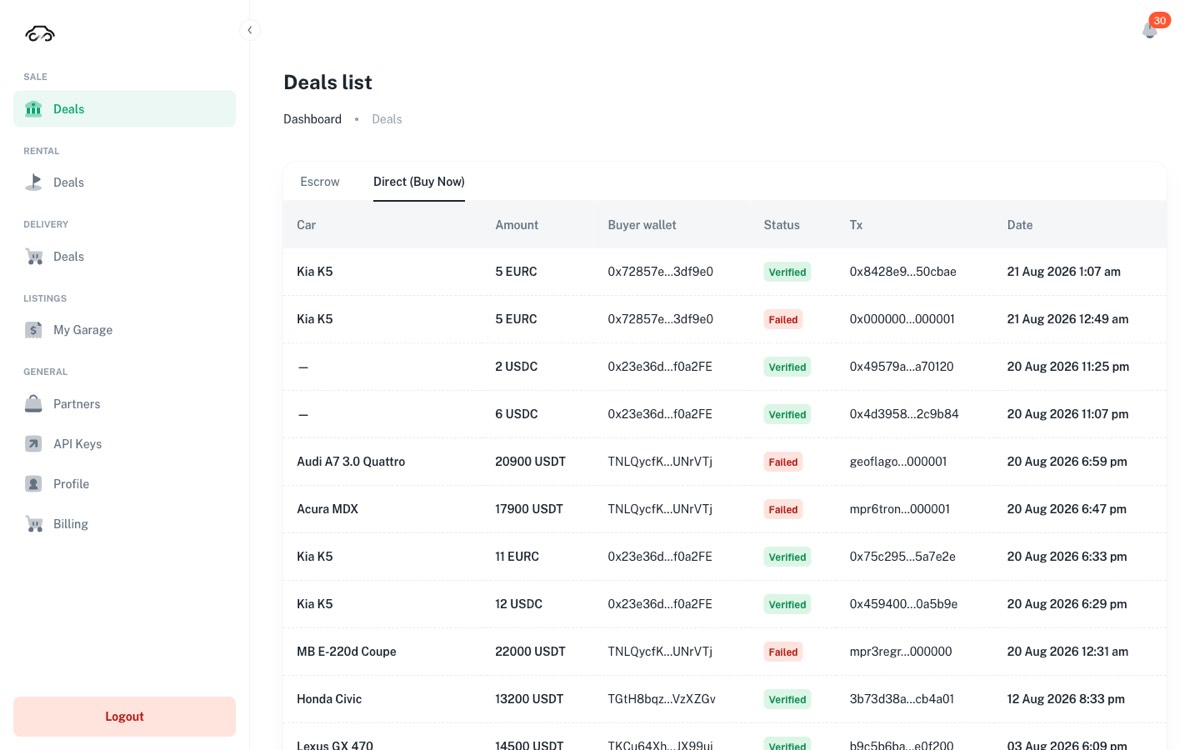
- Verified — the payment was found on the blockchain and checked. The money is yours; release the car.
- Verified — платёж найден в блокчейне и проверен. Деньги ваши, машину можно отдавать.
- Failed — the attempt did not confirm. No money arrived, and the car stays on sale. Nothing for you to undo.
- Failed — попытка не подтвердилась. Деньги не пришли, машина остаётся в продаже. Отменять ничего не нужно.
- Tx is the transaction reference. Send it to the office if accounting asks where a payment came from.
- Tx — ссылка на транзакцию. Передайте её в офис, если бухгалтерия спросит, откуда пришли деньги.
A buyer showing you a payment on their phone is not proof. The row in your dashboard turning Verified is.
Покупатель, показывающий платёж на своём телефоне, — не доказательство. Доказательство — строка Verified в вашем кабинете.
Delivery orders
Заказы с доставкой
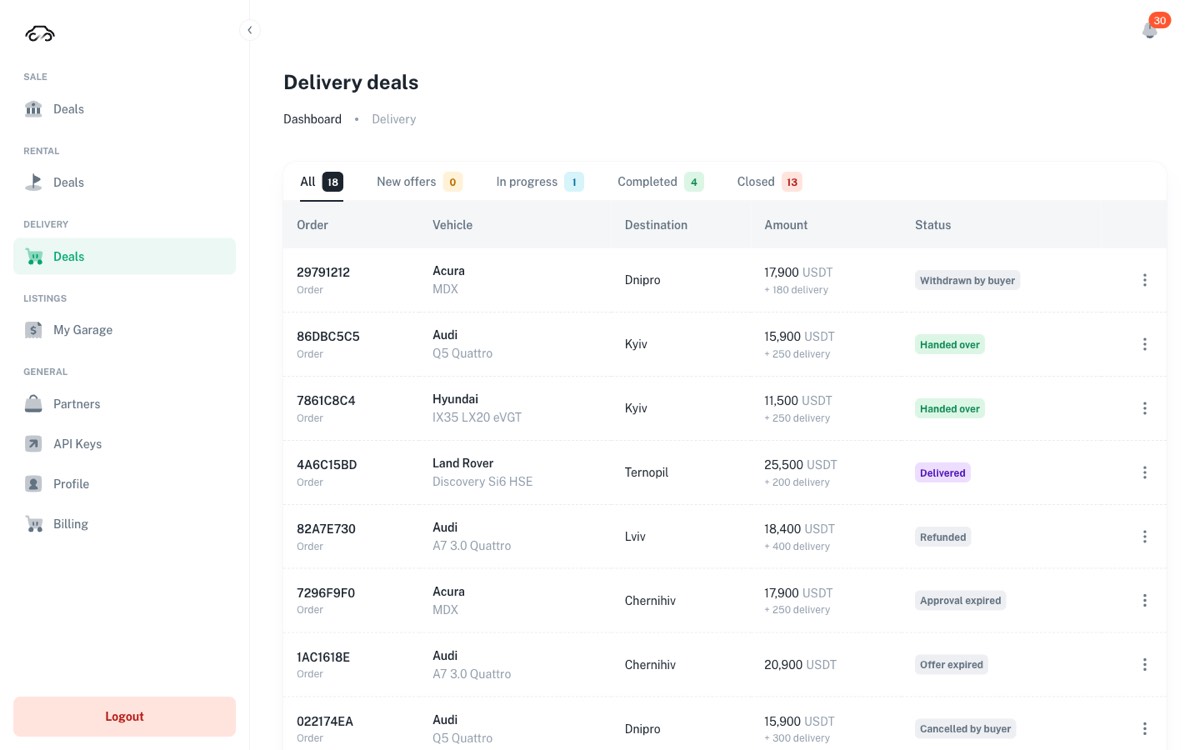
A buyer in another city can order the car with delivery. This is the one sale path where the deal waits for you: until you quote a delivery price, nothing moves.
Покупатель из другого города может заказать машину с доставкой. Это единственный путь продажи, где сделка ждёт именно вас: пока вы не назовёте цену доставки, ничего не произойдёт.
The order's life
Жизнь заказа
- New offer. The order appears with the destination city. Open the row menu and choose Approve — a dialog asks for the logist (see Partners) and the delivery price to that city, at least 1 in the deal's currency. That quote is added to the buyer's invoice and it reserves the car.
- New offer. Заказ приходит с городом назначения. В меню строки выберите Approve — в диалоге выберите логиста (см. Партнёры) и укажите цену доставки в этот город, не меньше 1 в валюте сделки. Эта сумма добавляется в счёт покупателю и резервирует машину.
- Approved — awaiting payment. The buyer pays. If they do not, the order becomes Approval expired and the car returns to the storefront by itself.
- Approved — awaiting payment. Покупатель оплачивает. Если не оплатит, заказ станет Approval expired, и машина сама вернётся в витрину.
- Funded — awaiting pickup. The money is on the contract. From here you can raise a dispute if something is wrong — and only from here.
- Funded — awaiting pickup. Деньги на контракте. Именно с этого момента — и только с него — можно поднять спор, если что-то пошло не так.
- Picked up → Delivered → Handed over. The transport side moves it along; Handed over is the finished state.
- Picked up → Delivered → Handed over. Дальше двигает перевозка; Handed over — завершённое состояние.
Opening an order shows the invoice as the buyer sees it — car price, your delivery quote, the platform fee and the total — plus the escrow contract address with a link to the blockchain explorer.
Внутри заказа — счёт в том виде, в каком его видит покупатель: цена машины, ваша цена доставки, комиссия платформы и итог, — а также адрес эскроу-контракта со ссылкой на блокчейн-эксплорер.
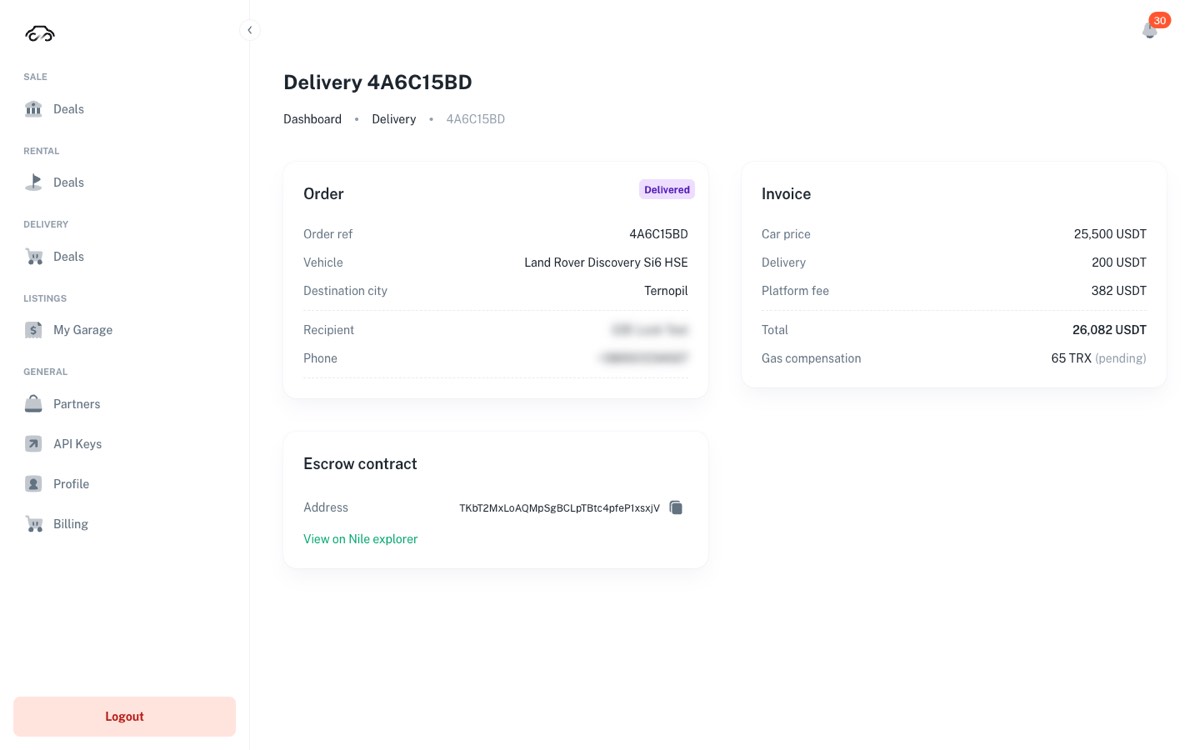
Once approved, the quote is fixed for that order. Made a mistake? Decline the order and ask the buyer to place it again — that is the only way to re-price it.
После подтверждения цена по этому заказу зафиксирована. Ошиблись — отклоните заказ и попросите покупателя оформить его заново; другого способа поменять цену нет.
While a delivery order is live, the car leaves the storefront and appears in Archive as Reserved — delivery. That is a hold, not a sale: if the order is declined, cancelled or expires, the car comes back on its own. After pickup the badge becomes Sold — delivery.
Пока заказ на доставку живой, машина уходит из витрины и лежит в Archive как Reserved — delivery. Это резерв, а не продажа: если заказ отклонён, отменён или истёк, машина вернётся сама. После забора машины бейдж станет Sold — delivery.
Partners — your logist
Партнёры — ваш логист
A delivery order needs a logist: the transport company that picks the car up, drives it to the buyer's city and is paid its delivery price by the contract at pickup. You choose who does it. Open Partners in the sidebar.
Заказу с доставкой нужен логист — транспортная компания, которая забирает машину, везёт её в город покупателя и получает свою цену доставки от контракта в момент забора. Кого взять, решаете вы. Откройте Partners в меню.
Who is in the list
Кто в списке
Only logists the platform has checked. You see the ones registered in your country, plus your own invited logist wherever it is. Your country comes from your region: set it in Profile → Business profile (Country, City). Logists of your city carry the chip Your region and come first. Your own logist carries Your invited logist, and only you see it.
В списке только логисты, которых проверила платформа: зарегистрированные в вашей стране и ваш приглашённый логист, где бы он ни был. Страна берётся из вашего региона — он задаётся в Profile → Business profile (Country, City). У логистов вашего города чип Your region, они стоят первыми. У вашего логиста чип Your invited logist, и видите его только вы.
To work with a logist, tick it in the list. Only ticked logists are offered when you approve a delivery order.
Чтобы работать с логистом, отметьте его галочкой. При подтверждении заказа с доставкой предлагаются только отмеченные логисты.
Set your region in Profile to see partners in your area — your region is not set yet; until it is, you see only your own invited logist. GlobalAutoChain has no verified partners in this region yet — nobody in your country has been checked yet: invite your own logist.
Set your region in Profile to see partners in your area — регион ещё не задан; пока его нет, виден только ваш приглашённый логист. GlobalAutoChain has no verified partners in this region yet — в вашей стране пока никого не проверили: пригласите своего логиста.
Invite your logist
Пригласите своего логиста
- Click Invite your logist, then Create link.
- Нажмите Invite your logist, затем Create link.
- Copy link and send it to your logist by messenger or email. The link is valid for 3 days, and one company can register with it.
- Нажмите Copy link и отправьте ссылку логисту в мессенджер или на почту. Ссылка действует 3 дня, по ней может зарегистрироваться одна компания.
- Your logist opens the link, fills in the company form and confirms the code from the email. The platform checks the application; once it is approved, the logist appears in your list with Your invited logist.
- Логист открывает ссылку, заполняет анкету компании и подтверждает код из письма. Платформа проверяет заявку; после одобрения логист появляется в вашем списке с чипом Your invited logist.
The links you have not used yet are under Active links in the same dialog. Sent one to the wrong person? Revoke it.
Неиспользованные ссылки — в том же окне, в разделе Active links. Отправили не тому человеку — нажмите Revoke.
Untick any other logist and that is all. Your invited logist works for you alone, so removing it asks why: write the reason and press Remove. The logist is told, and can ask the platform to work for other dealers too.
Любого другого логиста достаточно просто снять галочкой. Ваш приглашённый логист работает только на вас, поэтому кабинет спросит причину: напишите её и нажмите Remove. Логист получит уведомление и сможет попросить платформу работать с другими дилерами.
Choosing the logist when you approve
Выбор логиста при подтверждении
In Delivery → Deals, Approve asks for two things: the Logist and the delivery price. The list holds your ticked logists. A logist with no wallet on the deal's network is shown but cannot be chosen (No wallet on Base). When exactly one logist fits, it is already filled in.
В Delivery → Deals окно Approve спрашивает две вещи: Logist и цену доставки. В списке ваши отмеченные логисты. Логист без кошелька в сети сделки виден, но выбрать его нельзя (No wallet on Base). Если подходит ровно один, он уже подставлен.
- Choose a logist on the Partners page first — there are logists you can work with, but you have ticked none.
- Choose a logist on the Partners page first — логисты, с которыми можно работать, есть, но вы не отметили ни одного.
- GlobalAutoChain has no verified logists in your region yet… — there is nobody to choose. Invite your own logist, or decline the order: Decline stays available.
- GlobalAutoChain has no verified logists in your region yet… — выбрать некого. Пригласите своего логиста или отклоните заказ: кнопка Decline остаётся.
Once the buyer has paid, the deal page shows the logist's contacts (Logist, Logist phone, Logist email); the buyer sees them too.
Когда покупатель оплатил, на странице сделки появляются контакты логиста (Logist, Logist phone, Logist email); покупатель видит их тоже.
The car sold in the showroom
Машину продали в салоне
A car sold to a walk-in customer must be taken off the storefront the same day, or someone online will try to buy a car you no longer have. Row menu → Sold offline.
Машину, проданную клиенту в салоне, нужно снять с витрины в тот же день — иначе её попытается купить кто-то онлайн. Меню строки → Sold offline.
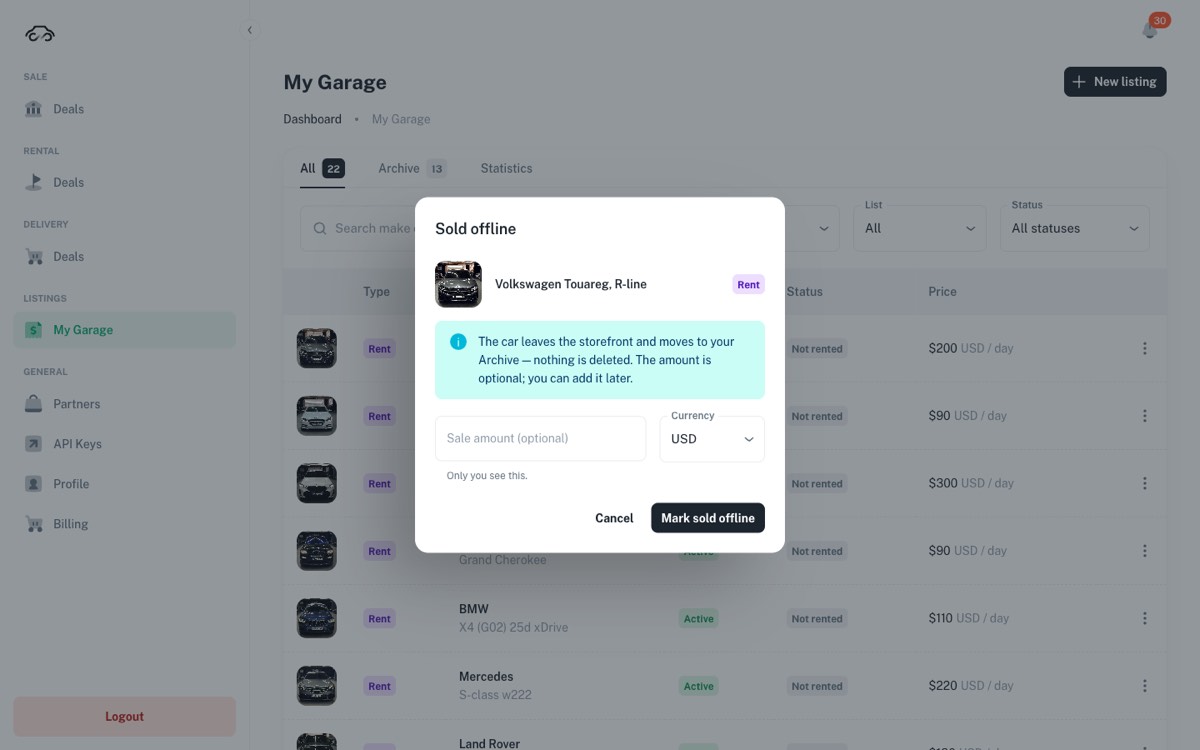
- The sale amount is for your own bookkeeping — buyers never see it, and you can add it later.
- Сумма продажи — для вашего учёта: покупатели её не видят, и вписать её можно позже.
- The menu item disappears when the car is already Sale in progress or Sold — you cannot sell offline a car that is inside a live deal.
- Пункт исчезает, если машина уже Sale in progress или Sold — продать офлайн машину внутри живой сделки нельзя.
- Archived cars live in the Archive tab with the amount you booked shown in place of the asking price.
- Архивные машины лежат во вкладке Archive, и вместо цены показывается сумма, которую вы записали.
Not selling? Move it to rental
Не продаётся — переведите в аренду
A car that has been sitting on the lot can earn while it waits. Row menu → Convert to rent copies the photos, VIN, year, colour, mileage, description and currency into a rental card, so you only fill in the rental terms.
Машина, которая долго стоит на площадке, может зарабатывать, пока ждёт покупателя. Меню строки → Convert to rent копирует фото, VIN, год, цвет, пробег, описание и валюту в арендную карточку — вам остаётся заполнить условия аренды.
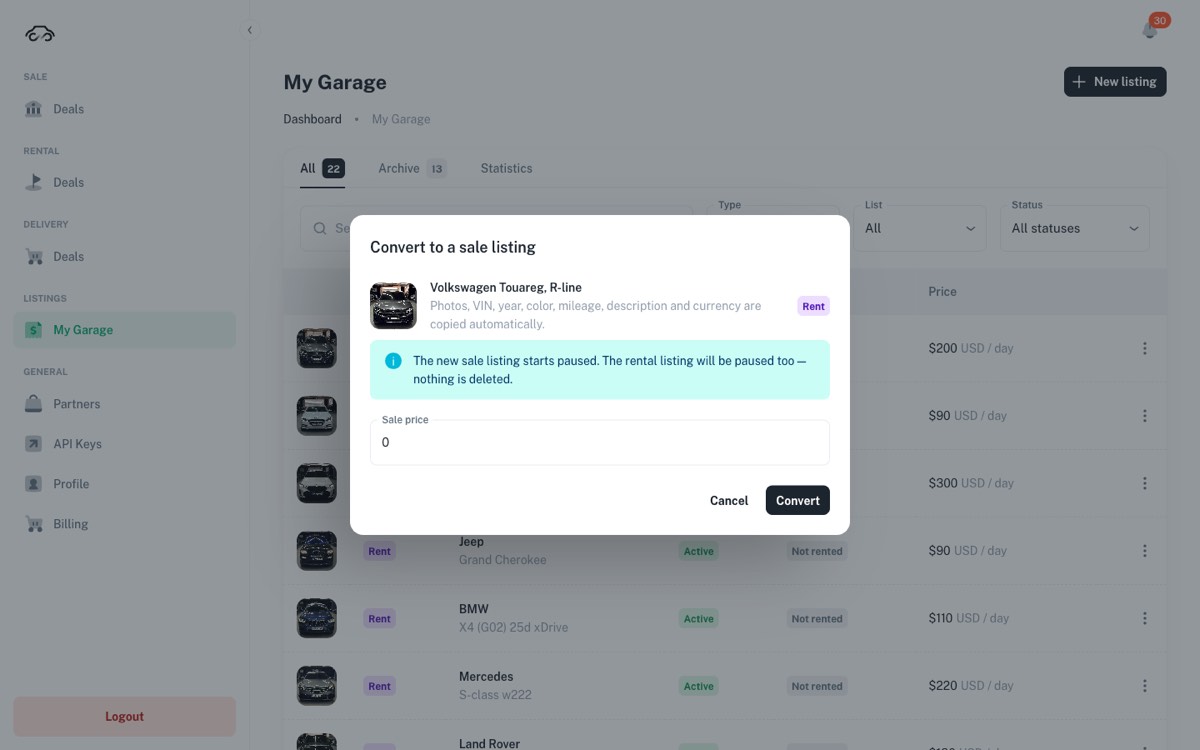
The same menu works the other way: a rental car can be converted to a sale listing when the owner decides to sell it. Rental terms are covered in the companion guide.
То же меню работает и в обратную сторону: арендную машину можно перевести в продажу, когда владелец решил её продать. Условия аренды разобраны в соседнем гайде.
Your showroom QR
QR-код салона
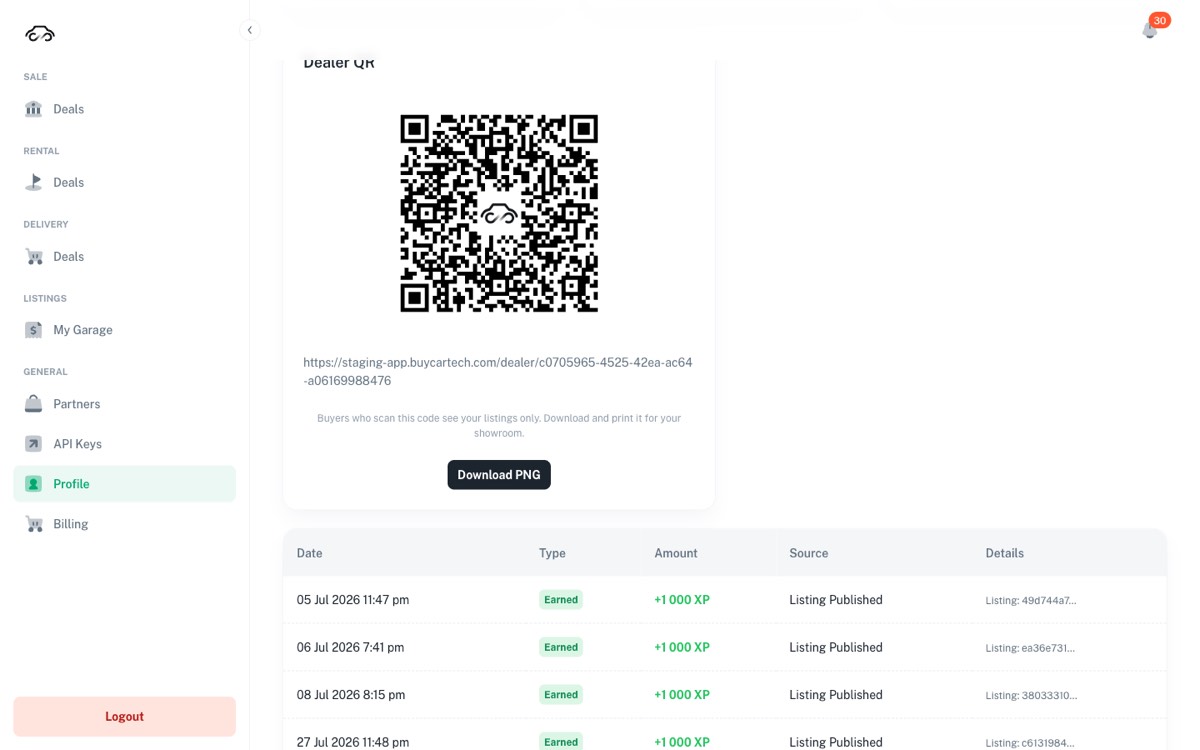
General → Profile holds a QR code that opens your cars only. Press Download PNG, print it, and put it on the desk, the window and the price tags. A visitor scans it and lands on your inventory instead of the whole marketplace.
В General → Profile есть QR-код, который открывает только ваши машины. Нажмите Download PNG, распечатайте и поставьте на стол, на витрину и на ценники. Посетитель сканирует — и попадает в ваш склад, а не в общий маркетплейс.
Reading the numbers
Читаем цифры
The Statistics tab in My Garage answers "how did we do". Tick the streams you care about — Escrow sale, Direct sale, Rent — choose a Period, and narrow to one car with Listing.
Вкладка Statistics в My Garage отвечает на вопрос «как сработали». Отметьте нужные потоки — Escrow sale, Direct sale, Rent, — выберите Period и при желании одну машину в Listing.
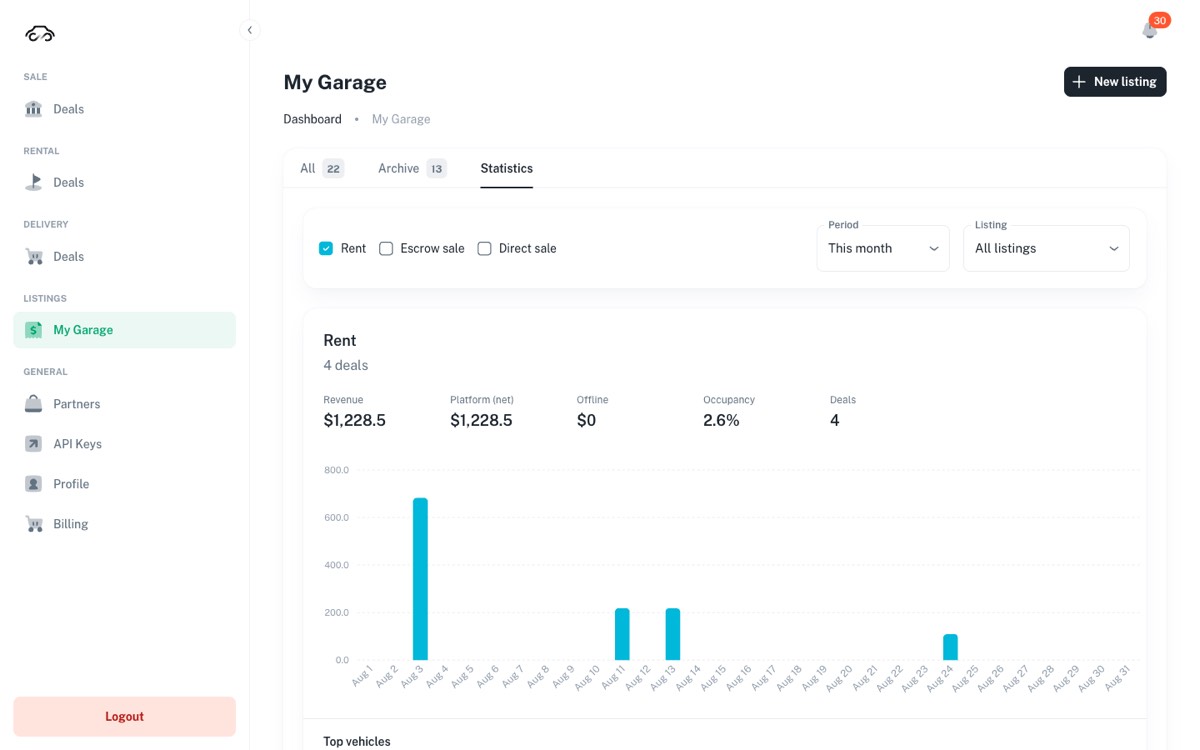
- Revenue — what the selected streams brought in over the period.
- Revenue — сколько принесли выбранные потоки за период.
- Platform (net) — the part that came through GAC, after the platform's cut.
- Platform (net) — часть, прошедшая через GAC, за вычетом доли платформы.
- Offline — the sums you typed into "Sold offline" dialogs. Type them in and this number stops lying.
- Offline — суммы, которые вы вписали в диалогах «Sold offline». Вписывайте их, и эта цифра перестанет врать.
When something looks wrong
Если что-то выглядит не так
| What you see | Что видите | What it usually is | Что это обычно |
|---|---|---|---|
| A car vanished from the storefront | Машина пропала из витрины | Look in Archive: it was either marked Sold offline or is held by a delivery order (Reserved — delivery). | Смотрите в Archive: либо отмечена Sold offline, либо её держит заказ на доставку (Reserved — delivery). |
| "Sold offline" is missing from the menu | В меню нет «Sold offline» | The car is inside a live deal or already sold. Finish or cancel the deal first. | По машине идёт сделка или она уже продана. Сначала завершите или отмените сделку. |
| Publishing is refused | Публикация отклонена | The Dealer subscription is not active — General → Billing. | Подписка Dealer неактивна — General → Billing. |
| I cannot find my API key | Не могу найти свой API-ключ | A key is shown once, when it is issued; the list keeps only its last four characters. Issue a new key in General → API Keys, put it in place of the old one, then delete the old one. | Ключ показывается один раз, при выпуске; в списке остаются только последние четыре символа. Выпустите новый в General → API Keys, поставьте его вместо старого и удалите старый. |
| A button does nothing | Кнопка не срабатывает | The session expired in this tab. Reload, sign in, repeat the action. | Сессия во вкладке истекла. Обновите страницу, войдите и повторите действие. |
| A Buy Now row says Failed | Строка Buy Now — Failed | The buyer's payment did not confirm. Nothing arrived, the car is still on sale, and the buyer can simply try again. | Платёж покупателя не подтвердился. Ничего не пришло, машина в продаже, покупатель может просто повторить попытку. |
| A card shows Draft · needs info | Карточка — Draft · needs info | It was created automatically and has no terms yet. Open it, fill it in, publish. | Создана автоматически, условия не заполнены. Откройте, заполните, опубликуйте. |
The legal part, in plain words
Юридическая часть простыми словами
Dealers ask these questions at the desk, so know the answers. This is a short, honest summary — the binding text is in the documents linked at the end of this section.
Эти вопросы задают прямо у стойки, поэтому ответы стоит знать. Ниже — короткая и честная выжимка; обязательную силу имеют документы по ссылкам в конце раздела.
- GAC is not a party to your deal. The platform is a technology provider — not a car dealer, broker, escrow agent, payment service provider, financial institution or custodian of funds. The contract of sale or rental is concluded between the users themselves; deals are peer-to-peer.
- GAC не является стороной сделки. Платформа — технологический провайдер: не автодилер, не брокер, не эскроу-агент, не платёжный сервис, не финансовая организация и не хранитель средств. Договор купли-продажи или аренды заключается между самими пользователями; сделки — peer-to-peer.
- The money is in the contract, not with us. Funds sit in a smart contract on a public blockchain and move only when the agreed steps are confirmed. GAC cannot move them on its own — which also means GAC cannot "just send the money back" on request.
- Деньги в контракте, а не у нас. Средства лежат в смарт-контракте в публичном блокчейне и двигаются только при подтверждении согласованных шагов. GAC не может двигать их сам — а значит, и «просто вернуть деньги» по просьбе тоже не может.
- Users must be 18+ and legally able to enter into contracts.
- Пользователю должно быть 18+, и он должен иметь право заключать договоры.
- Sanctions restrictions apply. The platform is not offered to people or companies residing, located or registered in Cuba, Iran, Syria, the Russian Federation, North Korea, or the Crimea, Donetsk, Luhansk, Kherson and Zaporizhzhia regions of Ukraine, or any other embargoed territory. Getting around this with a VPN is prohibited, and eligibility can be verified at any time.
- Действуют санкционные ограничения. Платформа не предоставляется людям и компаниям, которые проживают, находятся или зарегистрированы на Кубе, в Иране, Сирии, Российской Федерации, КНДР, а также в Крыму, Донецкой, Луганской, Херсонской и Запорожской областях Украины и на иных территориях под эмбарго. Обход через VPN запрещён, право пользования может быть проверено в любой момент.
- Who operates the platform: BuyCar.tech OÜ, an Estonian company, registry code 17094494, Narva mnt 5, 10117 Tallinn, Estonia.
- Кто оператор платформы: BuyCar.tech OÜ, эстонская компания, регистрационный код 17094494, Narva mnt 5, 10117 Таллин, Эстония.
Terms of Service · Privacy Policy · Refund & Cancellation Policy · Pricing
Accepting them happens at registration. If a dealer asks a question this summary does not answer, send the document — do not improvise an answer.
Условия использования · Политика конфиденциальности · Политика возвратов и отмены · Тарифы
Принятие происходит при регистрации. Если вопрос выходит за рамки этой выжимки — отправляйте документ, а не придумывайте ответ.
The daily checklist
Чек-лист на день
- Delivery → Deals → New offers — approve or decline every fresh order; they expire on their own. Delivery → Deals → New offers — подтвердите или отклоните каждый новый заказ; они истекают сами.
- Sale → Deals → Direct (Buy Now) — check for new Verified payments. Sale → Deals → Direct (Buy Now) — проверьте новые Verified платежи.
- Escrow deals in progress — is any step waiting on something physical you were supposed to do? Идущие эскроу-сделки — не ждёт ли какой-то шаг физического действия с вашей стороны?
- Cars sold in the showroom yesterday — marked Sold offline with the amount. Машины, проданные вчера в салоне, — отмечены Sold offline с суммой.
- New arrivals on the lot — published, with photos and a real price. Новые машины на площадке — опубликованы, с фото и настоящей ценой.
- Anything in Draft · needs info — completed. Всё, что висит в Draft · needs info, — дозаполнено.