How the money works
Как устроены деньги
A GAC rental is held by a smart contract, not by an invoice. When a renter books, they pay three things at once: the rental itself, a refundable security deposit, and the platform fee. Where each part goes, and when, is the thing to know before you answer a single renter question.
Аренда в GAC держится смарт-контрактом, а не счётом. Оформляя бронь, арендатор платит сразу три части: саму аренду, возвратный депозит и комиссию платформы. Куда и когда уходит каждая часть — то, что нужно понимать раньше, чем отвечать арендатору на любой вопрос.
- Rental
- Аренда
- Paid to you when the renter accepts the car in their app — not when they book, and not when you hand over the keys.
- Приходит вам в момент, когда арендатор принял машину в приложении — не при бронировании и не при передаче ключей.
- Deposit
- Депозит
- Stays locked on the contract for the whole rental and through a 7-day inspection window after the car comes back.
- Заблокирован на контракте всю аренду и ещё 7 дней осмотра после возврата машины.
- Platform fee
- Комиссия платформы
- 9% of the rental, taken by GAC up front and non-refundable — including when the renter cancels.
- 9% от аренды, GAC берёт сразу, не возвращается — в том числе при отмене арендатором.
Confirming pickup, approving an extension, claiming damage and releasing the deposit are contract calls. The rental card shows Connect until the dealership wallet is connected in the browser — without it you can read the deal but not move it.
Подтверждение выдачи, согласование продления, удержание за ущерб и возврат депозита — это вызовы контракта. Пока кошелёк салона не подключён в браузере, карточка показывает Connect: сделку видно, но двигать её нельзя.
Getting started, and what it costs
Как начать и сколько это стоит
There are two account types, and the difference is simple: a personal account buys and rents, a Dealer account sells and lists. Publishing a car — for sale or for rent — is what needs the Dealer plan.
Аккаунта два, и разница простая: личный аккаунт покупает и арендует, аккаунт Dealer продаёт и публикует. Именно публикация машины — на продажу или в аренду — требует плана Dealer.
| Plan | План | Price | Цена | What you get | Что входит |
|---|---|---|---|---|---|
| Personal | Personal | Free | Бесплатно | Buying and renting, unlimited. Smart-contract protection on every deal, the deals CRM, notifications at every step. | Покупка и аренда без ограничений. Защита смарт-контрактом на каждой сделке, CRM сделок, уведомления на каждом шаге. |
| Dealer | Dealer | €89 / month Early access — free until billing launch |
€89 / месяц Ранний доступ — бесплатно до запуска биллинга |
Up to 80 cars in My Garage. Publishing listings, full fleet management, pause and resume, disputes, estimates, switching a car between rent and sale, request and overdue notifications, the extended contract with logistics and insurance partners. | До 80 машин в My Garage. Публикация объявлений, управление парком, пауза и возобновление, споры, оценки, перевод машины между арендой и продажей, уведомления о запросах и просрочках, расширенный контракт с партнёрами по логистике и страхованию. |
Two payments that never mix
Два платежа, которые нельзя путать
- The subscription is billed in euro, by card, through Stripe. It pays for the dashboard, not for a deal.
- Подписка списывается в евро, картой, через Stripe. Это плата за кабинет, а не за сделку.
- Deals are settled in USDC or another acceptable stablecoin and the money sits in the smart contract — not in a GAC wallet. The contract releases it when the agreed steps are confirmed.
- Сделки рассчитываются в USDC или другом приемлемом стейблкоине, и деньги лежат в смарт-контракте, а не в кошельке GAC. Контракт отдаёт их, когда подтверждены согласованные шаги.
- Rentals additionally carry the 9% platform fee, which is part of the rental price and is non-refundable.
- В аренде дополнительно есть комиссия платформы 9% — она входит в стоимость аренды и не возвращается.
Starting, pausing, stopping
Начать, приостановить, прекратить
- Register with your work email and choose the Dealer plan.
- Зарегистрируйтесь на рабочую почту и выберите план Dealer.
- Where a free trial is offered you enter the card at sign-up but nothing is charged during the trial; Stripe warns you before it ends. One trial per account.
- Если доступен пробный период, карту вводят при регистрации, но во время пробного периода списаний нет; Stripe предупредит до его окончания. Один пробный период на аккаунт.
- Link the dealership wallet afterwards — that is where deal money arrives.
- После этого привяжите кошелёк салона — именно туда приходят деньги по сделкам.
- Cancel any time: General → Billing → Manage subscription opens the Stripe portal, one click. No minimum term, no cancellation fee.
- Отменить можно в любой момент: General → Billing → Manage subscription открывает портал Stripe, один клик. Без минимального срока и без штрафа за отмену.
Access runs to the end of the period you already paid for; periods already charged are not refunded. After that you cannot publish new listings and your listings leave the public catalogue — but deals and rentals already in progress run to completion, with their locked funds, deposits and payouts, and your account, data and vehicles stay in place. Subscribing again restores publishing.
Доступ действует до конца уже оплаченного периода; за оплаченные периоды возврата нет. После этого публиковать новые объявления нельзя, а текущие уходят из публичного каталога — но уже идущие сделки и аренды доводятся до конца вместе с заблокированными средствами, депозитами и выплатами, а аккаунт, данные и машины остаются на месте. Новая подписка возвращает публикацию.
Creating a rental card
Создаём арендную карточку
In Listings → My Garage press New listing and choose Rental listing. The top of the form is the same car data as a sale listing — make, model, VIN, year, colour, mileage, description, photos. The rental-specific part is below it.
В Listings → My Garage нажмите New listing и выберите Rental listing. Верх формы — те же данные машины, что и в продаже: марка, модель, VIN, год, цвет, пробег, описание, фото. Всё арендное — ниже.
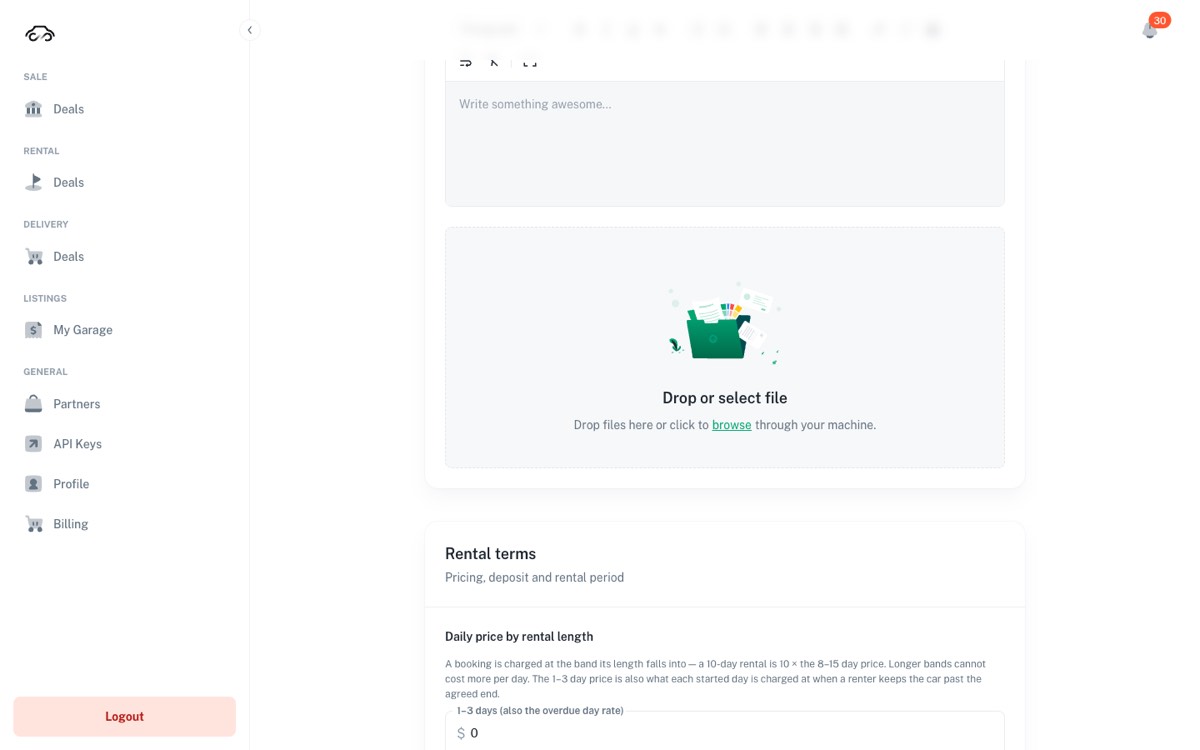
A car you already sell can become a rental car without retyping anything: in the row menu choose Convert to rent. Photos, VIN, year, colour, mileage, description and currency are copied over; both cards start paused, and nothing is deleted.
Машину, которая уже стоит на продаже, можно превратить в арендную без повторного ввода: в меню строки выберите Convert to rent. Фото, VIN, год, цвет, пробег, описание и валюта копируются; обе карточки стартуют на паузе, ничего не удаляется.
Rates, deposit and limits
Тарифы, депозит и лимиты
GAC prices a rental by bands, not by a single day rate. A booking is charged at the band its own length falls into: a 10-day rental is ten times the 8–15 days price. Two rules follow from that, and both are enforced by the form.
GAC считает аренду по диапазонам, а не по одной дневной ставке. Бронь считается по тому диапазону, в который попадает её длина: аренда на 10 дней — это десять дневных ставок 8–15 days. Отсюда два правила, и оба проверяет сама форма.
- A longer band can never cost more per day than a shorter one.
- Длинный диапазон не может стоить дороже за день, чем короткий.
- The 1–3 days price is also the overdue day rate — every started day past the agreed end is charged at it.
- Цена 1–3 days — это ещё и ставка за день просрочки: каждый начатый день сверх согласованного срока считается по ней.
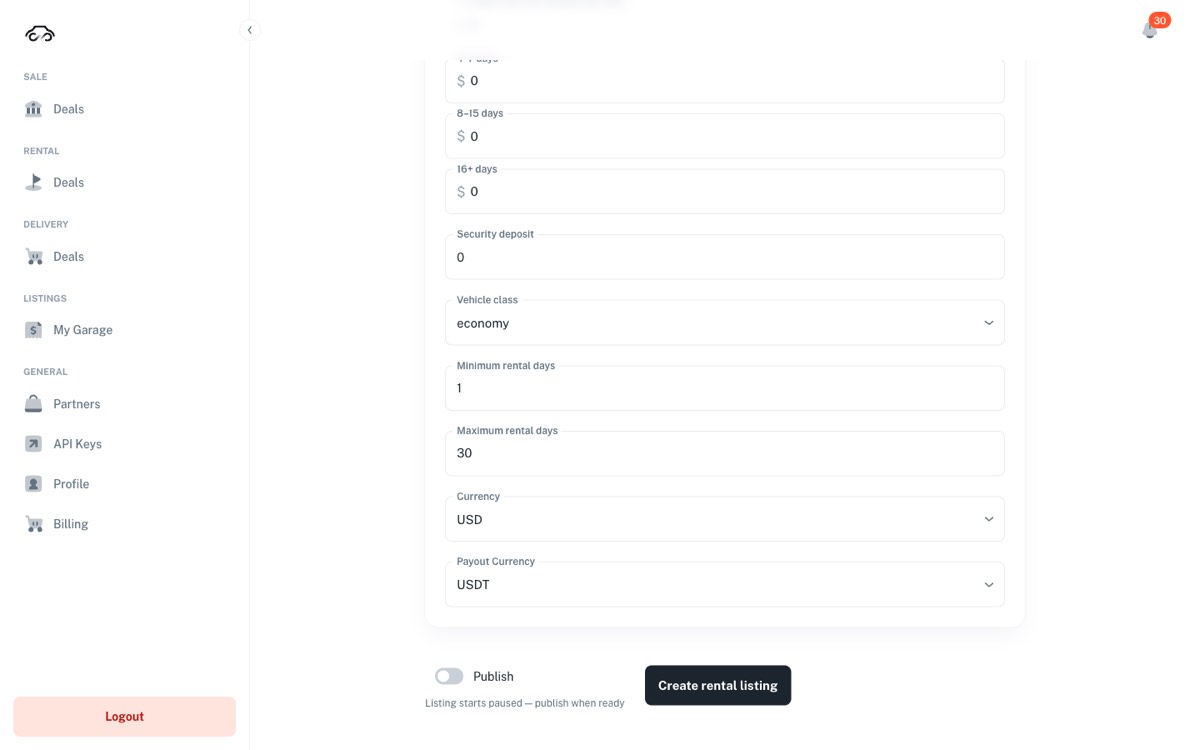
| Field | Поле | What to put in it | Что вписывать |
|---|---|---|---|
| 1–3 / 4–7 / 8–15 / 16+ days | The per-day price for each booking length. Short bookings cost more per day; long ones less. | Цена за день для каждой длины брони. Короткие — дороже за день, длинные — дешевле. | |
| Security deposit | The refundable hold. It is also your only source for a damage or fine claim, so set it against the real risk on that car. | Возвратный залог. Это же единственный источник для удержания за ущерб или штраф — ставьте его по реальному риску по этой машине. | |
| Vehicle class | Economy, premium and so on — how the car is filtered in the buyer app. | Economy, premium и т. д. — по этому фильтруют машину в приложении. | |
| Seats | How many people the car takes, the driver's seat included. Required to publish; the renter sees it on the card. | Сколько человек берёт машина, включая место водителя. Обязательно для публикации; арендатор видит это на карточке. | |
| Daily km limit / Unlimited km | How far the renter may drive in a day, in kilometres — or tick Unlimited km when there is no limit. One of the two is required to publish; the renter sees "300 km/day" or "Unlimited km" on the card. | Сколько километров в день может проехать арендатор — или поставьте галочку Unlimited km, если лимита нет. Одно из двух обязательно для публикации; арендатор видит «300 km/day» или «Unlimited km» на карточке. | |
| Minimum / Maximum rental days | The booking lengths you accept at all. | Длины брони, которые вы вообще принимаете. | |
| Currency / Payout Currency | What the renter sees, and the stablecoin you are paid in. | Что видит арендатор и в каком стейблкоине вы получаете деньги. |
The card starts paused — "Listing starts paused — publish when ready". Turn on Publish and press Create rental listing only once the rates and the deposit are the ones you would defend at the desk. Publishing also needs Seats and either Daily km limit or the Unlimited km tick: without them the form says "Seats are required to publish" under the field, and Enable in My Garage answers "Fill in before publishing" and names what is missing.
Карточка стартует на паузе — «Listing starts paused — publish when ready». Включайте Publish и жмите Create rental listing только когда тарифы и депозит — те, которые вы готовы отстаивать на стойке. Для публикации нужны ещё Seats и либо Daily km limit, либо галочка Unlimited km: без них форма напишет под полем «Seats are required to publish», а Enable в My Garage ответит «Fill in before publishing» и назовёт, чего не хватает.
The calendar is a promise
Календарь — это обещание
Open a rental card with Edit and scroll to Availability. It lists everything that makes the car unavailable: bookings made through GAC, and the dates you blocked yourself. If a car is rented to a walk-in customer and you do not block those dates here, GAC will happily sell them to someone else.
Откройте арендную карточку через Edit и пролистайте до Availability. Здесь всё, что делает машину недоступной: брони через GAC и даты, которые вы заблокировали сами. Если машину сдали клиенту в салоне, а даты здесь не закрыли, GAC спокойно продаст их другому арендатору.
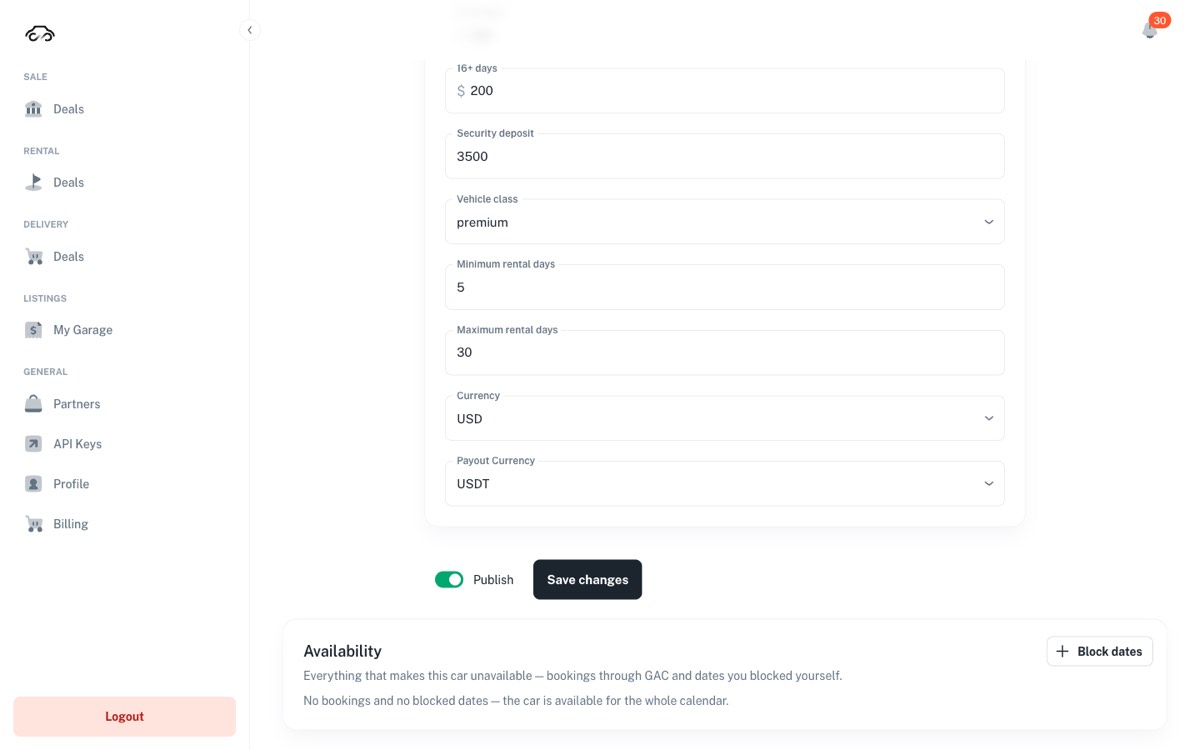
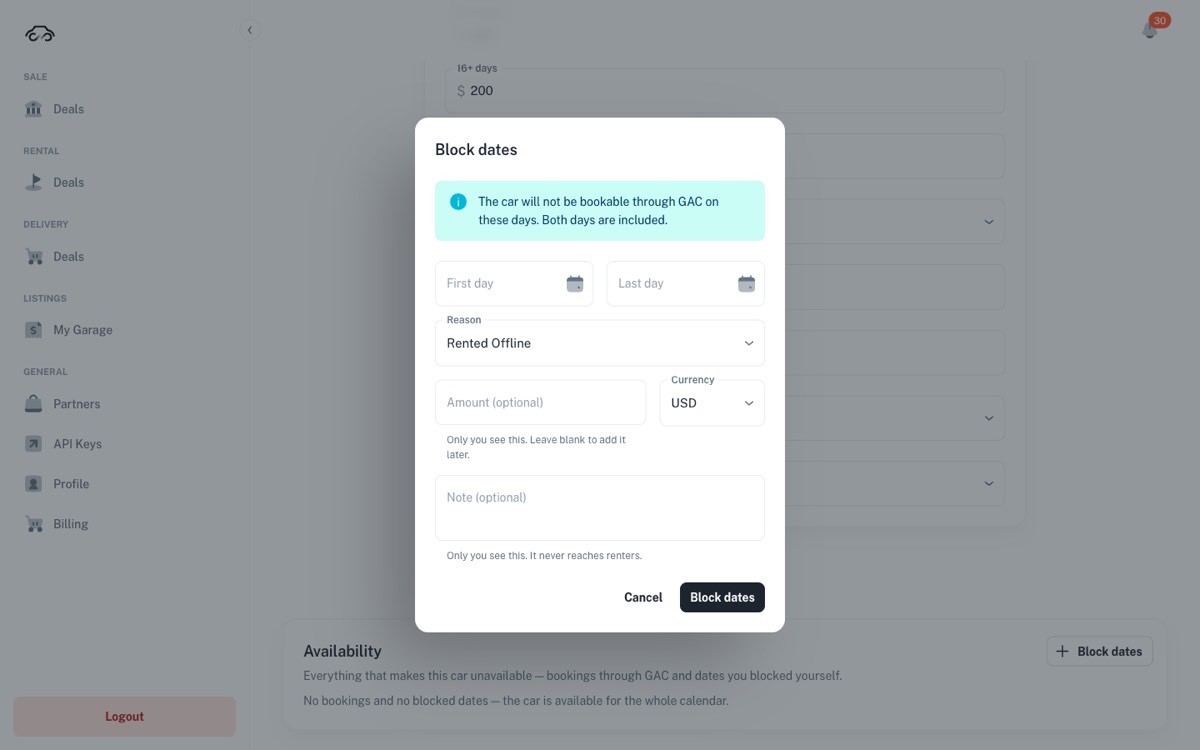
- Press Block dates.
- Нажмите Block dates.
- Set First day and Last day — both days are included in the block.
- Укажите First day и Last day — обе даты входят в блокировку.
- Pick a Reason, for example Rented Offline for a walk-in rental, or the reason that matches service or a transfer.
- Выберите Reason — например Rented Offline для аренды «с улицы» или причину под сервис либо перегон.
- Amount and Note are optional and private: only you see them, and they never reach renters.
- Amount и Note необязательны и приватны: их видите только вы, арендаторам они не показываются.
The bin icon on a block means Release these dates — the car becomes bookable again immediately. Do it only when the car is genuinely free; a misclick can hand a car that is already out on an offline rental to an online renter.
Иконка корзины на блокировке — это Release these dates: машина сразу снова доступна к брони. Делайте это, только если машина действительно свободна — случайный клик может отдать онлайн-арендатору машину, которая уже уехала по офлайн-аренде.
Cards that arrive half-made
Карточки, которые приходят полуготовыми
Some rental cards are created automatically from your feed. They appear in My Garage with a Draft · needs info badge and a dash instead of a price: the car is there, the rental terms are not. Nobody can book it until a manager opens it, fills in the bands and the deposit, and publishes it.
Часть арендных карточек создаётся автоматически из вашего потока. В My Garage они помечены Draft · needs info, а вместо цены стоит прочерк: машина есть, условий аренды нет. Забронировать её нельзя, пока менеджер не откроет карточку, не заполнит диапазоны и депозит и не опубликует её.
Treat that badge as a task, not a status. Every draft is a car that could be earning and is not.
Считайте этот бейдж задачей, а не статусом: каждый черновик — машина, которая могла бы зарабатывать, но не зарабатывает.
The rentals list
Список аренд
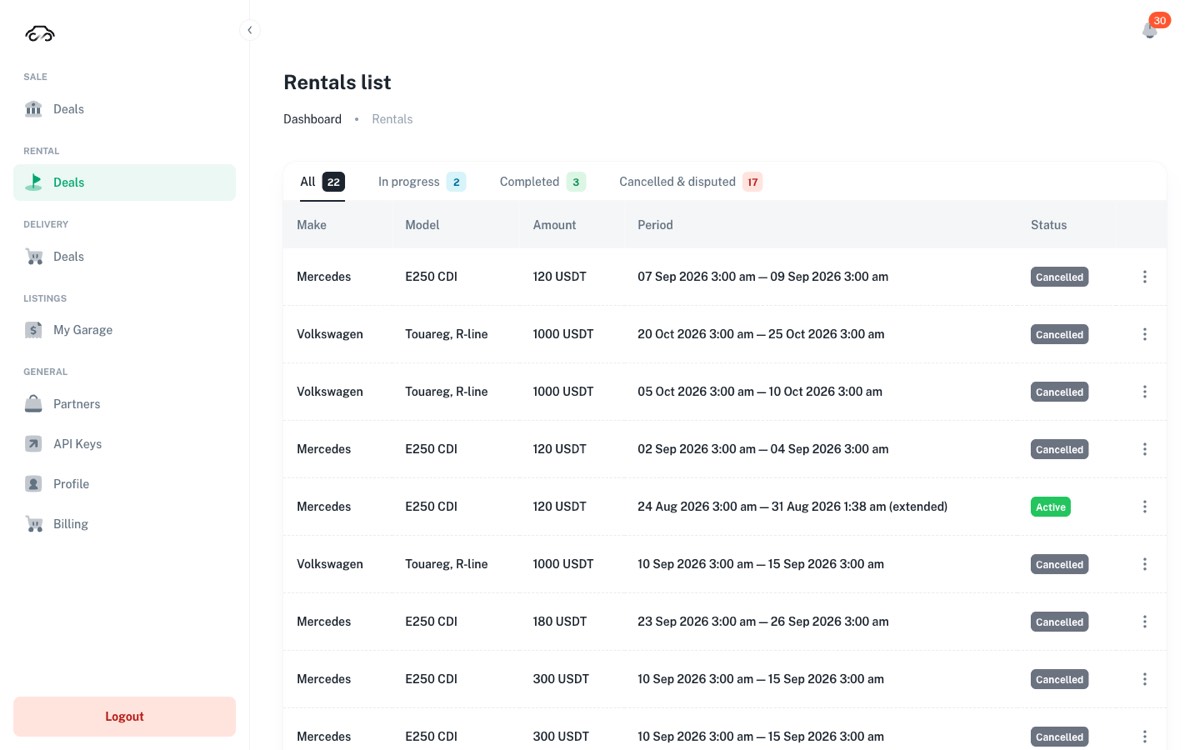
Deals → Rental is every booking on your cars, split into All, In progress, Late returns, Completed and Cancelled & disputed. Each row carries the car, the amount, the booked period and the status.
Deals → Rental — все брони по вашим машинам, разложенные по вкладкам All, In progress, Late returns, Completed и Cancelled & disputed. В строке — машина, сумма, забронированный период и статус.
Late returns lists every rental whose end date has passed and the car is not back: Overdue while the deposit still pays for each started day, and Deposit Out once the deposit is used up and the car is still out. Getting the car back is your job, so look at this tab from the first day of a delay. How the late days are charged is in Extensions and overdue days.
Во вкладке Late returns — все аренды, где срок вышел, а машина не вернулась: Overdue, пока депозит ещё оплачивает каждый начатый день, и Deposit Out, когда депозит кончился, а машины всё нет. Вернуть машину — ваша задача, поэтому смотрите эту вкладку с первого дня просрочки. Как считаются дни просрочки — в разделе «Продление и просрочка».
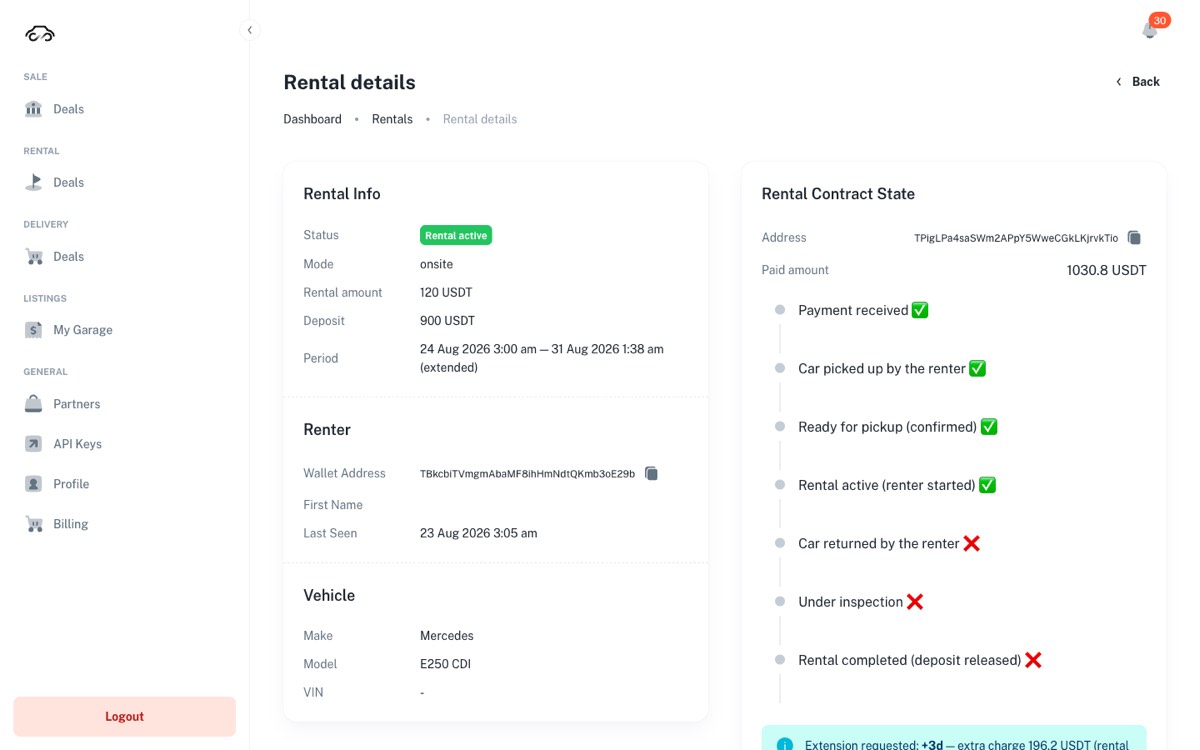
Opening a rental gives you two columns. On the left, Rental Info — status, mode, rental amount, deposit, the period — plus the renter's wallet and the vehicle. On the right, Rental Contract State: the same steps as the contract sees them, with a tick for done and a cross for not yet, and the buttons for whatever comes next.
Внутри аренды — две колонки. Слева Rental Info: статус, режим, сумма аренды, депозит, период, кошелёк арендатора и машина. Справа Rental Contract State: те же шаги, как их видит контракт — галочка, если шаг пройден, крест, если нет, — и кнопки для следующего действия.
Handing the car over
Выдаём машину
Rentals run in onsite mode: the renter collects the car from you, so the confirmations at handover are yours to make. The contract card always shows one button — the next step it will accept. Press what it offers, in this order:
Аренда идёт в режиме onsite: арендатор забирает машину у вас, поэтому подтверждения при выдаче делаете вы. Карточка контракта всегда показывает одну кнопку — следующий шаг, который она примет. Нажимайте то, что предлагается, в таком порядке:
- Confirm pickup (car handed to renter) — you have given the renter the car.
- Confirm pickup (car handed to renter) — вы передали машину арендатору.
- Confirm ready for pickup — the handover is confirmed from your side and the renter can accept.
- Confirm ready for pickup — передача подтверждена с вашей стороны, арендатор может принимать.
- The renter accepts the car in their app. Only now does the rental clock start — and only now is the rental money sent to you.
- Арендатор принимает машину в приложении. Только сейчас стартует срок аренды — и только сейчас деньги за аренду уходят вам.
The renter must accept the car within the booked period. Nudge them to press accept while they are still at the desk — the walk-away "I'll do it later" is what turns into a support ticket.
Арендатор должен принять машину в пределах забронированного периода. Просите нажать «принять» прямо у стойки — именно «сделаю позже» превращается потом в обращение в поддержку.
Extensions and overdue days
Продление и просрочка
A renter can ask to keep the car longer. The request lands on the rental card as a note saying how many extra days and exactly what it costs — priced at your published rate for a rental of that new length, plus the 9% fee, pulled from the renter's wallet the moment you approve.
Арендатор может попросить продлить аренду. Запрос появляется на карточке аренды запиской: сколько дней добавляется и сколько это стоит — по вашему опубликованному тарифу для новой длины аренды плюс 9% комиссии, списывается с кошелька арендатора в момент подтверждения.
- Approve extension — the new end date applies and the extra rental is transferred.
- Approve extension — новая дата окончания вступает в силу, доплата за аренду переводится.
- Decline — the rental keeps its original end date. Use it when the car is already booked by someone else.
- Decline — аренда сохраняет исходную дату окончания. Применяйте, если машина уже забронирована другим.
- Days the renter has already paid for are never sold twice: new days are added after the current end.
- Уже оплаченные дни не продаются дважды: новые дни добавляются после текущей даты окончания.
If the rental is already past its end date, every started day is charged at the 1–3 days rate and the card says how much the renter owes. Approval is impossible until they settle that amount — so chase the debt first, then extend.
Если срок аренды уже вышел, каждый начатый день считается по ставке 1–3 days, и карточка показывает сумму долга. Пока арендатор её не погасит, продление невозможно — сначала долг, потом продление.
Return, inspection, deposit
Возврат, осмотр, депозит
When the car comes back, the contract moves to Under inspection and starts a 7-day window. Two different things are frozen during it, and only one of them is under your control.
Когда машина вернулась, контракт переходит в Under inspection и запускает 7-дневное окно. В это время заморожены две разные вещи, и только одна из них зависит от вас.
| Frozen | Заморожено | Unfreezes | Размораживается |
|---|---|---|---|
| The car's dates | Даты машины | By you, with Inspection OK — reopen dates, as soon as you have looked the car over. This affects the calendar only. | Вами, кнопкой Inspection OK — reopen dates, как только осмотрели машину. Влияет только на календарь. |
| The deposit | Депозит | By the contract, after the full 7 days. Nobody — not you, not support — can release it earlier. | Контрактом, после полных 7 дней. Раньше его не вернёт никто — ни вы, ни поддержка. |
Once the window has passed and you have no claim, press Release deposit — the remaining deposit goes back to the renter and the rental is closed.
Когда окно прошло и претензий нет, нажмите Release deposit — остаток депозита возвращается арендатору, аренда закрывается.
If a renter brings the car back early, the contract does not recalculate the unused days by itself. Refunding them is a manual step through GAC support — agree the amount with the renter and raise it there rather than promising an automatic refund.
Если арендатор вернул машину раньше срока, контракт сам неиспользованные дни не пересчитывает. Возврат за них делается вручную через поддержку GAC — согласуйте сумму с арендатором и заводите обращение, а не обещайте автоматический возврат.
Damage and traffic fines
Ущерб и штрафы
Damage and fines are claimed from the deposit through the same form — there is no separate mechanism for fines. On the rental card, under Claim from the deposit:
Ущерб и штрафы удерживаются из депозита одной и той же формой — отдельного механизма для штрафов нет. На карточке аренды, в блоке Claim from the deposit:
- Amount to claim — more than zero and no more than the deposit left.
- Amount to claim — больше нуля и не больше остатка депозита.
- What are you claiming for? — Damage to the vehicle or Traffic fine. The renter sees this.
- What are you claiming for? — Damage to the vehicle или Traffic fine. Арендатор это увидит.
- Evidence reference — a link to the inspection photos, or the fine number and the authority that issued it. Required.
- Evidence reference — ссылка на фото осмотра либо номер постановления и орган, который его выписал. Обязательно.
- Press Report damage or Claim the fine. The renter then accepts it or disputes it.
- Нажмите Report damage или Claim the fine. Дальше арендатор принимает удержание или оспаривает.
If the renter disputes, the deposit is held under GAC arbitration until the case is resolved. Weak evidence is what loses those cases, so photograph the car at handover and at return as a habit.
Если арендатор оспорит, депозит удерживается под арбитражем GAC до решения. Слабые доказательства — главная причина проигранных споров, поэтому фотографируйте машину при выдаче и при возврате как правило.
Filing a defect pulls the car out of rental, and it stays off the market until you switch its listing back on. Resolving the deposit claim does not do it for you. When the car is repaired and ready, go to Listings → My Garage and use Enable on the card.
Заявленный дефект снимает машину с аренды, и она остаётся вне рынка, пока вы сами не включите её листинг обратно. Решение по удержанию депозита это не делает. Когда машина отремонтирована и готова, зайдите в Listings → My Garage и нажмите Enable на карточке.
When something looks wrong
Если что-то выглядит не так
| What you see | Что видите | What it usually is | Что это обычно |
|---|---|---|---|
| The card shows Connect and no buttons | На карточке Connect и нет кнопок | The dealership wallet is not connected in this browser. Connect it, then the action appears. | Кошелёк салона не подключён в этом браузере. Подключите — кнопка появится. |
| The renter says the money never arrived | Арендатор говорит, что деньги не пришли | The rental is transferred when the renter accepts the car, not when they book. Check the contract steps on the card. | Аренда переводится, когда арендатор принял машину, а не при бронировании. Проверьте шаги контракта на карточке. |
| A free car cannot be booked | Свободную машину нельзя забронировать | Check Availability for a block you forgot, and check whether a defect report parked the car. | Проверьте Availability — забытая блокировка — и не снят ли автомобиль с рынка после дефекта. |
| The deposit will not release | Депозит не отдаётся | The 7-day inspection window has not passed. This is a contract rule, not a setting. | Не прошло 7-дневное окно осмотра. Это правило контракта, а не настройка. |
| An extension cannot be approved | Продление не подтверждается | The rental is overdue and the renter owes for the started days. They pay first. | Аренда просрочена, и за начатые дни есть долг. Сначала оплата. |
| A card shows Draft · needs info | Карточка — Draft · needs info | Created automatically, no rates yet. Fill in the bands and the deposit, then publish. | Создана автоматически, тарифов нет. Заполните диапазоны и депозит, затем опубликуйте. |
| I cannot find the API key the bot uses | Не могу найти API-ключ, с которым работает бот | A key is shown once, when it is issued; the list keeps only its last four characters. Issue a new key in General → API Keys, send the bot /setkey and the new key from the same Telegram account, then delete the old key. | Ключ показывается один раз, при выпуске; в списке остаются только последние четыре символа. Выпустите новый в General → API Keys, отправьте боту /setkey и новый ключ из того же аккаунта Telegram, затем удалите старый ключ. |
The legal part, in plain words
Юридическая часть простыми словами
Dealers ask these questions at the desk, so know the answers. This is a short, honest summary — the binding text is in the documents linked at the end of this section.
Эти вопросы задают прямо у стойки, поэтому ответы стоит знать. Ниже — короткая и честная выжимка; обязательную силу имеют документы по ссылкам в конце раздела.
- GAC is not a party to your deal. The platform is a technology provider — not a car dealer, broker, escrow agent, payment service provider, financial institution or custodian of funds. The contract of sale or rental is concluded between the users themselves; deals are peer-to-peer.
- GAC не является стороной сделки. Платформа — технологический провайдер: не автодилер, не брокер, не эскроу-агент, не платёжный сервис, не финансовая организация и не хранитель средств. Договор купли-продажи или аренды заключается между самими пользователями; сделки — peer-to-peer.
- The money is in the contract, not with us. Funds sit in a smart contract on a public blockchain and move only when the agreed steps are confirmed. GAC cannot move them on its own — which also means GAC cannot "just send the money back" on request.
- Деньги в контракте, а не у нас. Средства лежат в смарт-контракте в публичном блокчейне и двигаются только при подтверждении согласованных шагов. GAC не может двигать их сам — а значит, и «просто вернуть деньги» по просьбе тоже не может.
- Users must be 18+ and legally able to enter into contracts.
- Пользователю должно быть 18+, и он должен иметь право заключать договоры.
- Sanctions restrictions apply. The platform is not offered to people or companies residing, located or registered in Cuba, Iran, Syria, the Russian Federation, North Korea, or the Crimea, Donetsk, Luhansk, Kherson and Zaporizhzhia regions of Ukraine, or any other embargoed territory. Getting around this with a VPN is prohibited, and eligibility can be verified at any time.
- Действуют санкционные ограничения. Платформа не предоставляется людям и компаниям, которые проживают, находятся или зарегистрированы на Кубе, в Иране, Сирии, Российской Федерации, КНДР, а также в Крыму, Донецкой, Луганской, Херсонской и Запорожской областях Украины и на иных территориях под эмбарго. Обход через VPN запрещён, право пользования может быть проверено в любой момент.
- Who operates the platform: BuyCar.tech OÜ, an Estonian company, registry code 17094494, Narva mnt 5, 10117 Tallinn, Estonia.
- Кто оператор платформы: BuyCar.tech OÜ, эстонская компания, регистрационный код 17094494, Narva mnt 5, 10117 Таллин, Эстония.
Terms of Service · Privacy Policy · Refund & Cancellation Policy · Pricing
Accepting them happens at registration. If a dealer asks a question this summary does not answer, send the document — do not improvise an answer.
Условия использования · Политика конфиденциальности · Политика возвратов и отмены · Тарифы
Принятие происходит при регистрации. Если вопрос выходит за рамки этой выжимки — отправляйте документ, а не придумывайте ответ.
Checklists
Чек-листы
Handing a car over
Выдача машины
- Photos of the car taken, including existing damage and the fuel level.Сделаны фото машины, включая имеющиеся повреждения и уровень топлива.
- Confirm pickup pressed on the rental card.На карточке аренды нажат Confirm pickup.
- Confirm ready for pickup pressed. Нажат Confirm ready for pickup.
- The renter accepted the car in their app before leaving the desk.Арендатор принял машину в приложении, ещё стоя у стойки.
Taking a car back
Приём машины
- Photos of the returned car taken the same day. Фото возвращённой машины сделаны в тот же день.
- Damage or a fine? Claim filed with an evidence reference, before you release anything.Есть ущерб или штраф? Удержание заявлено с доказательством — до того, как что-то отпущено.
- Car inspected and clean → Inspection OK — reopen dates so it can earn again. Машина осмотрена и в порядке → Inspection OK — reopen dates, чтобы она снова зарабатывала.
- After the 7-day window with no claim → Release deposit. Через 7 дней без претензий → Release deposit.
Every morning
Каждое утро
- Offline rentals from yesterday blocked in Availability. Вчерашние офлайн-аренды закрыты в Availability.
- Extension requests answered — approved or declined. Запросы на продление отвечены — согласованы или отклонены.
- Cars returned yesterday — dates reopened if the inspection is done. Вчера возвращённые машины — даты открыты, если осмотр закончен.
- Repaired cars switched back on with Enable. Отремонтированные машины включены обратно кнопкой Enable.
- Nothing left in Draft · needs info.Ничего не висит в Draft · needs info.